5 Live Work Samples · CRE Automation Stack · FL & TX
This System Runs While You Close
Apollo → Airtable → Make → Pipedrive → ClickUp
Most VAs show you templates. I show you live systems running in production. Every screenshot on this page comes from a real pipeline built for CRE brokers — from the first ICP search to the last client task created automatically the moment a deal is won.
Live system — not mockups
5 tools · 4 Make scenarios
33 screenshots · zero manual data entry
Full stackApollo ✓→Airtable ✓→Make · 4 scenarios ✓→Groq AI ✓→Email Outreach ✓→Pipedrive ✓→ClickUp ✓
Work Sample 01 · Lead Sourcing
Apollo.io ICP Precision Prospecting
Your next 10 deals are already in a database. The question is whether your search finds them — or buries them under 1,343 irrelevant results. This is how we built a system that finds only the right ones, then opens every conversation with something worth reading.
Leads copied manually from LinkedIn. Generic email sent to everyone. 2–3 hours/week of pure admin. Replies: close to zero.
⚙️ Built
Apollo AI trained on business positioning. ICP Persona with 5 precision filters. 160 decision-makers extracted from 1,343. 3-step sequence with Anthropic Claude Haiku writing a unique opening line for every single contact.
📈 Output
Every email opens with a sentence referencing the contact's own LinkedIn headline — written by AI, sent automatically. The broker's name shows up in the right inbox, saying the right thing, before they touch the phone.
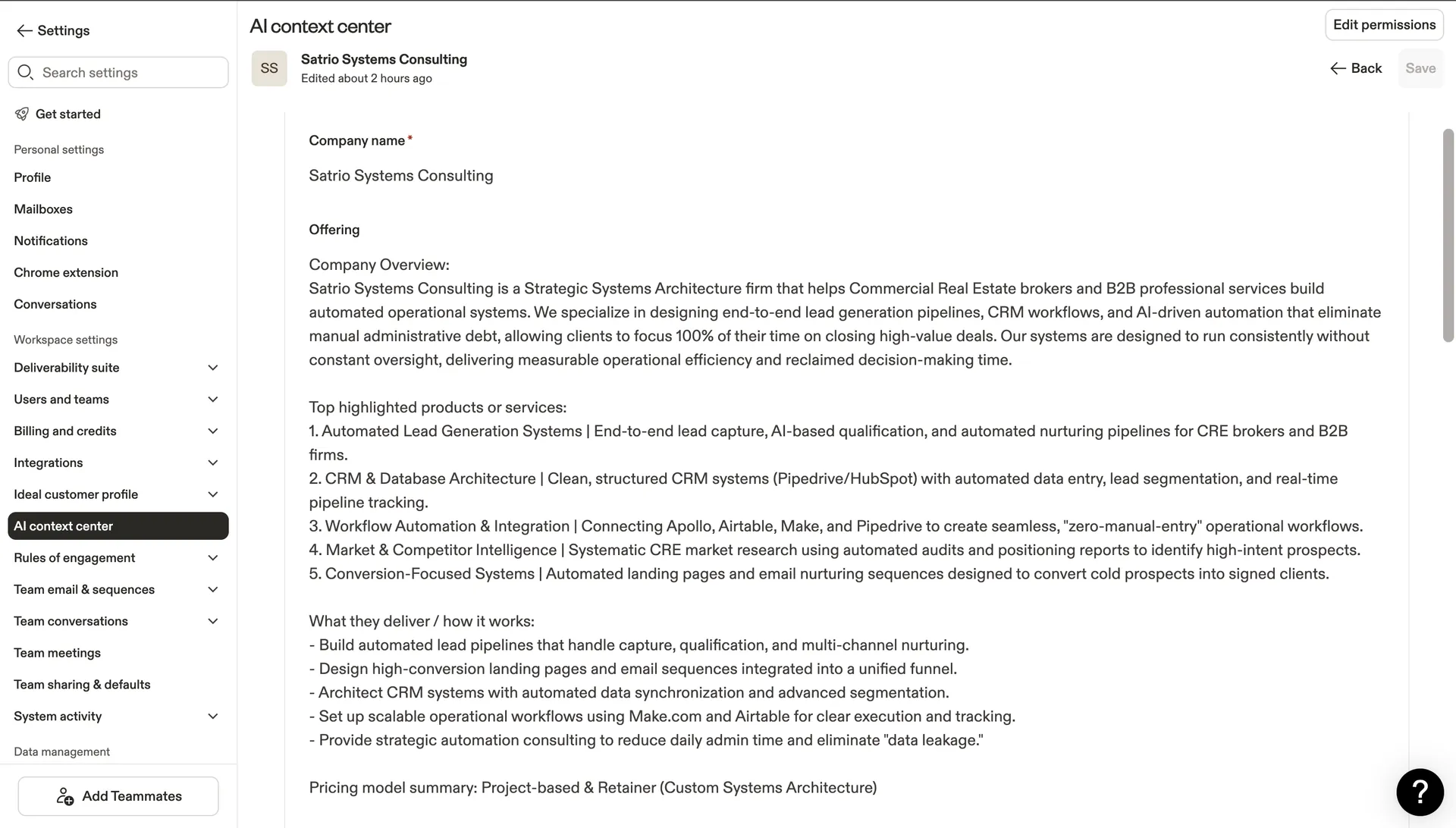
Apollo · AI Context Center
Apollo learns who we are — so every AI output knows exactly who to target
Company name, 5 core services, pricing model, and delivery method — all fed into Apollo's AI engine. This context informs fit scoring, email generation, and prospect analysis across the entire account. Most users skip this step. We don't.
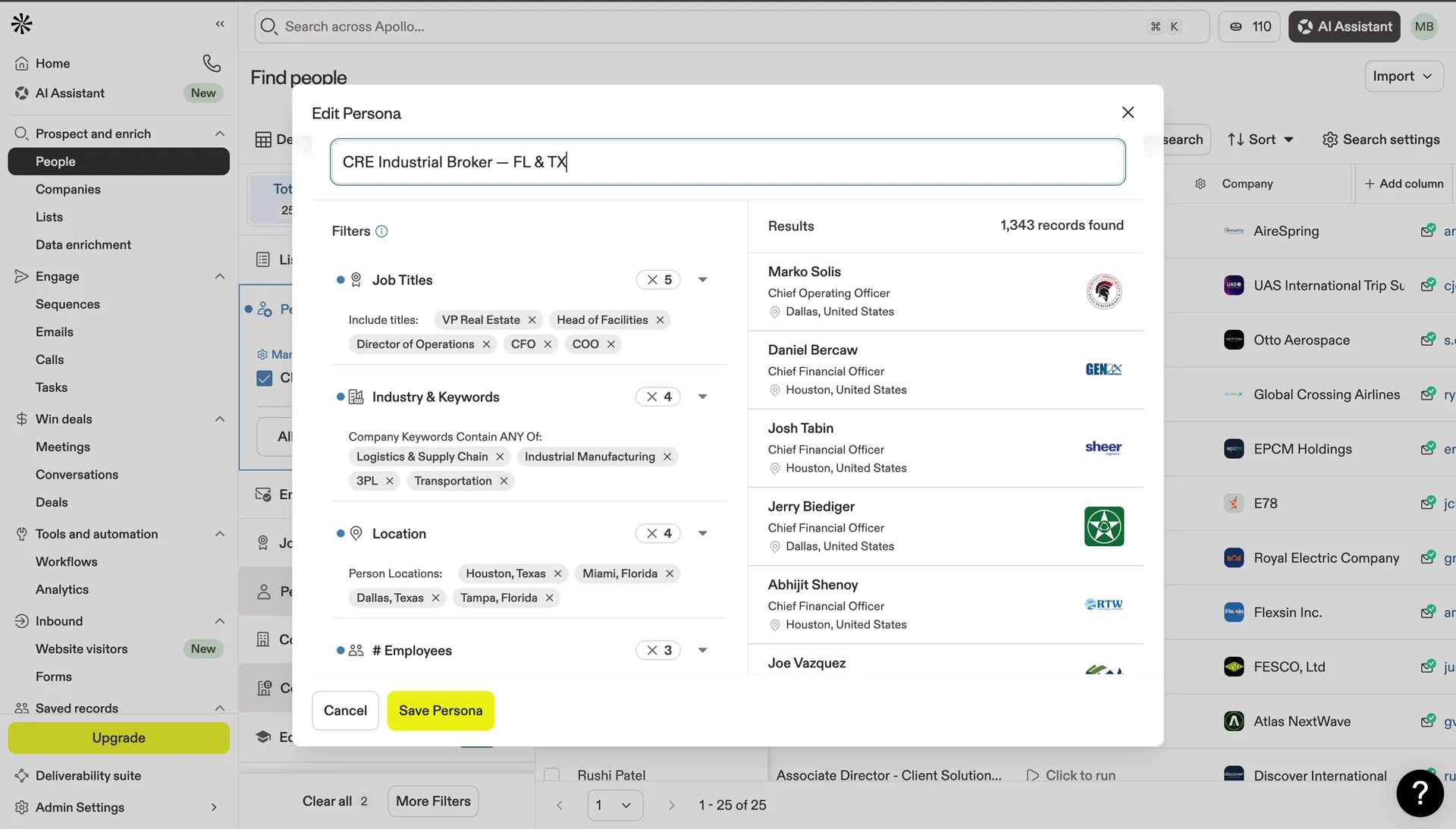
Apollo · ICP Persona
"CRE Industrial Broker — FL & TX" — 1,343 records
5 filters stacked: VP Real Estate / Head of Facilities / Director of Operations / CFO / COO. Logistics + Industrial + 3PL + Transportation. Houston, Miami, Dallas, Tampa. Headcount 100–1,000.
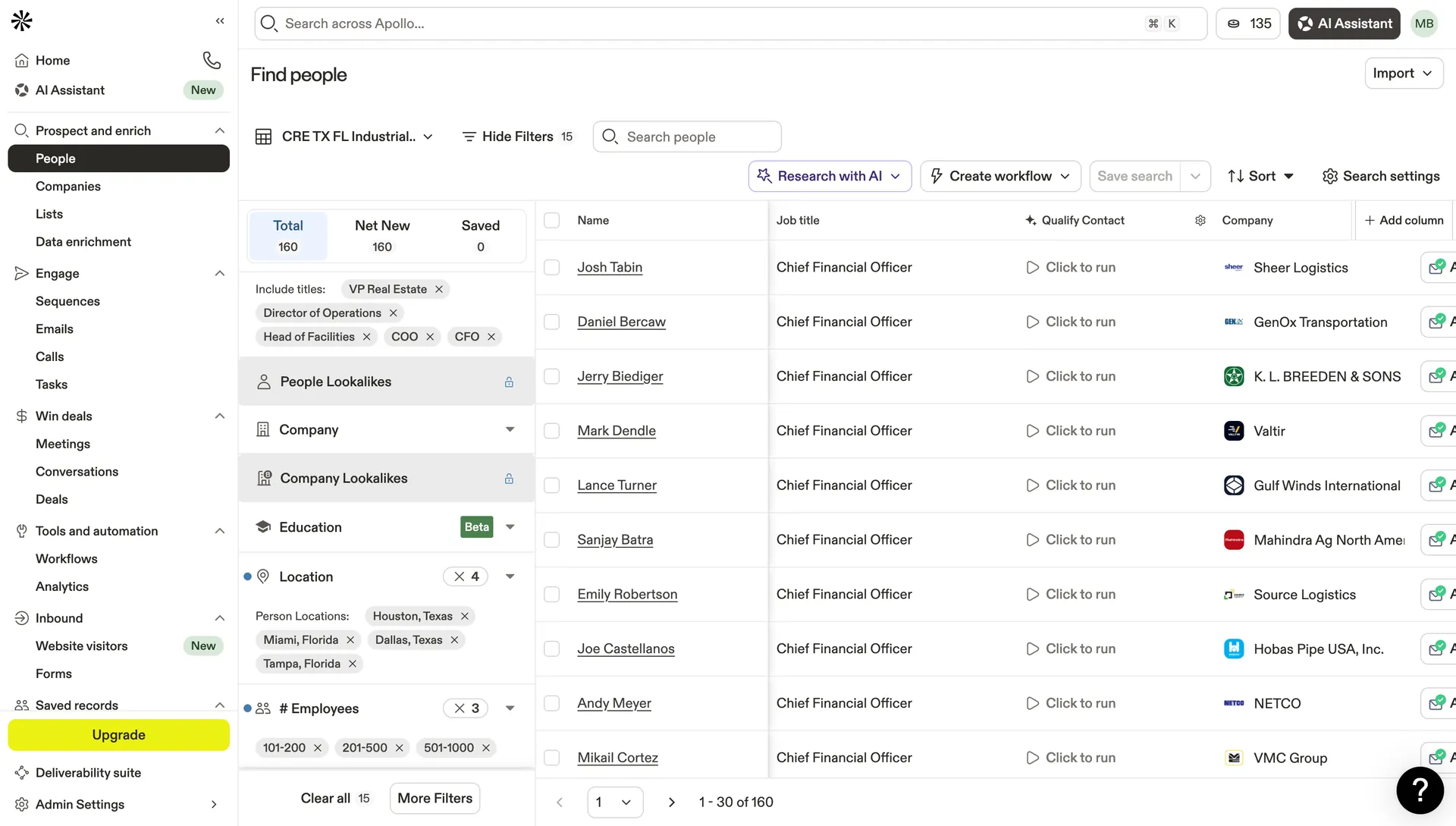
Apollo · People Search Result
1,343 narrowed to 160 — every one worth contacting
15 active filters. 160 Net New contacts. These aren't leads — they're decision-makers in logistics and industrial who actually have the authority and the budget to sign a lease.
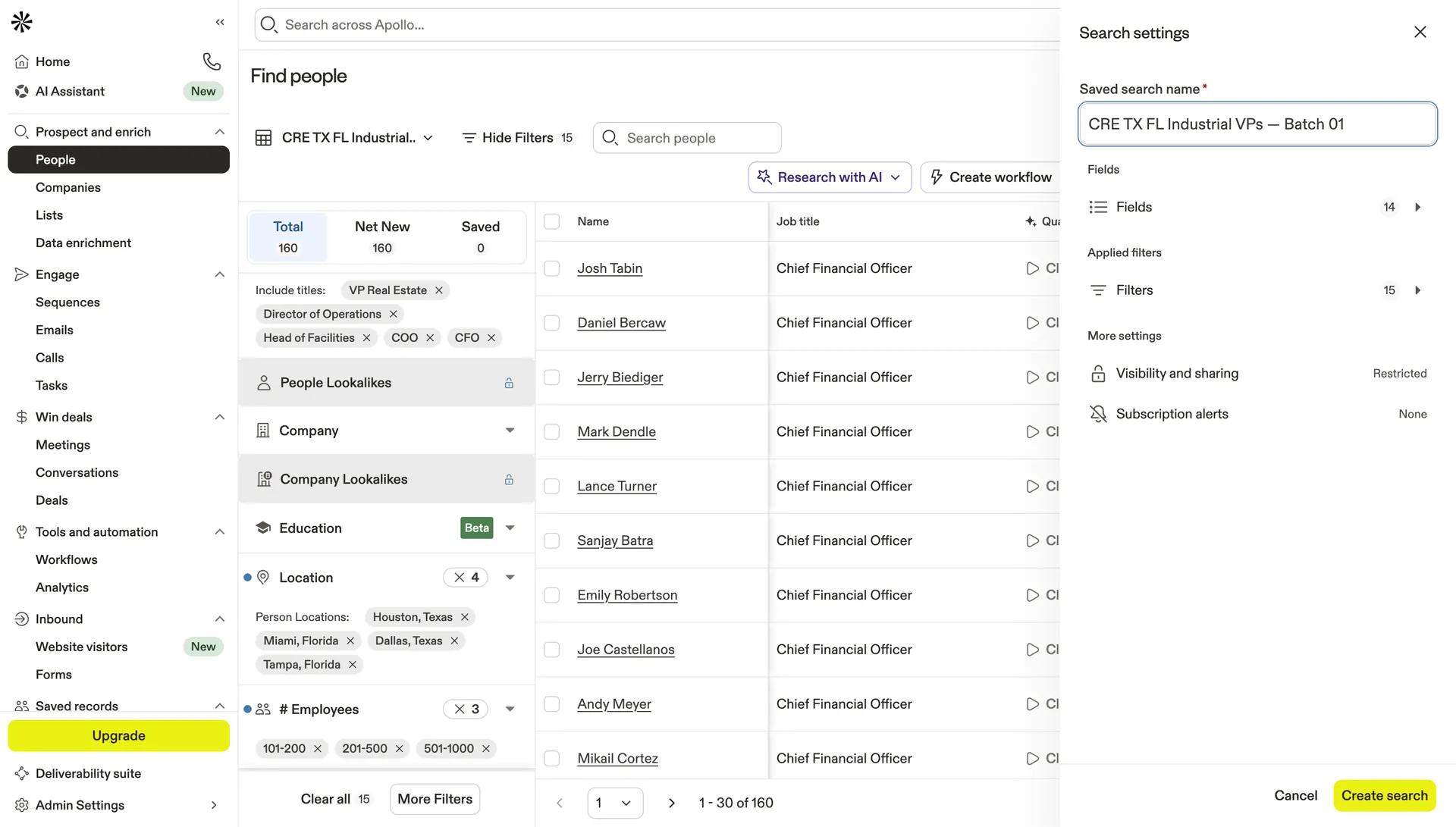
Apollo · Saved Search
Saved: "CRE TX FL Industrial VPs — Batch 01"
14 field configs + 15 filters saved. Re-run every week for a fresh batch of net-new contacts that weren't in last week's list — automatic pipeline refill on schedule.
Apollo · Outreach Sequence
3-touch sequence — Day 0 · Day +3 · Day +3 LinkedIn
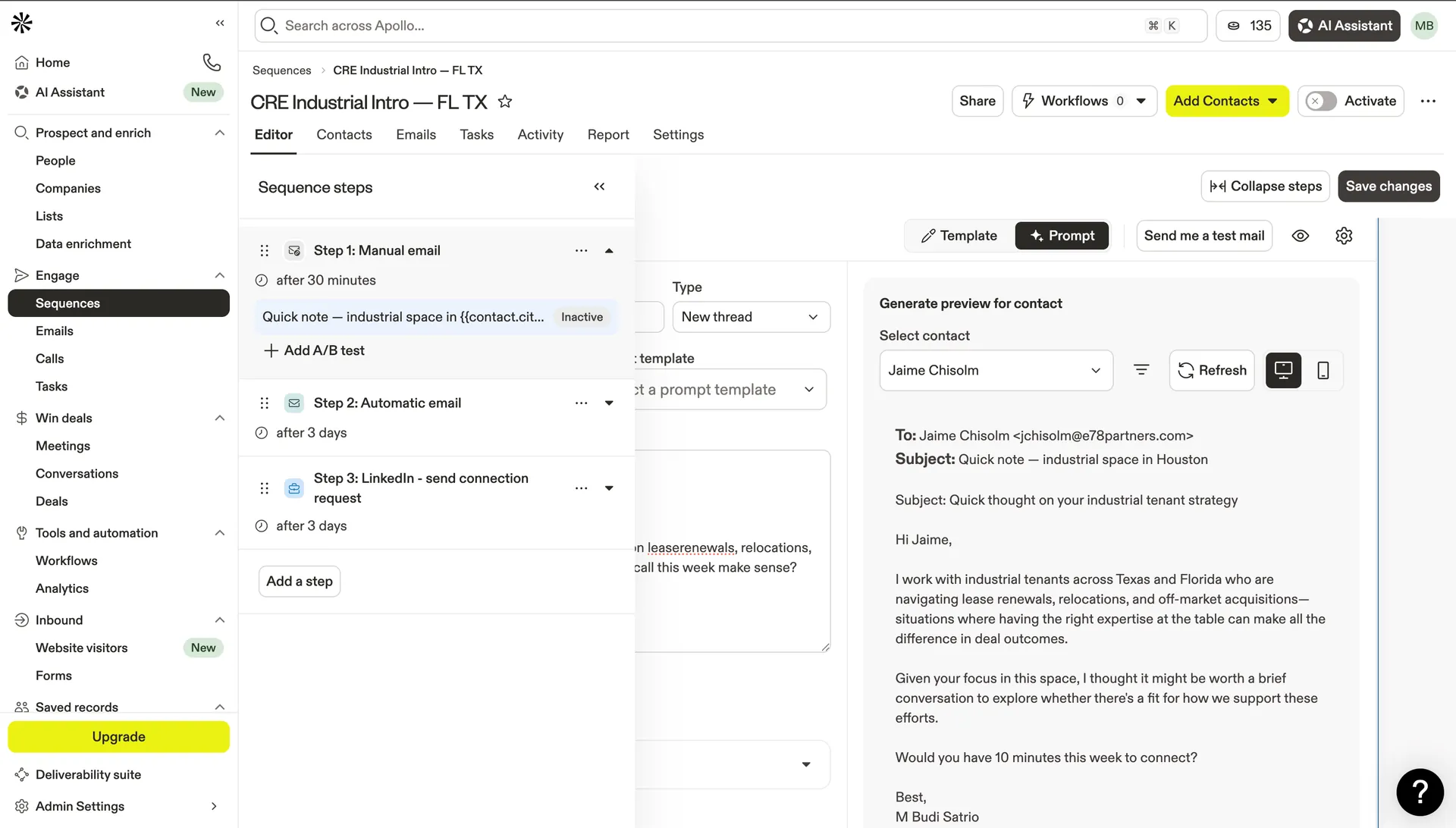
Step 1: AI-personalized email. Step 2: Automatic reply thread. Step 3: LinkedIn connection request. Contact sees the name three times in one week, across two channels, without the broker lifting a finger.
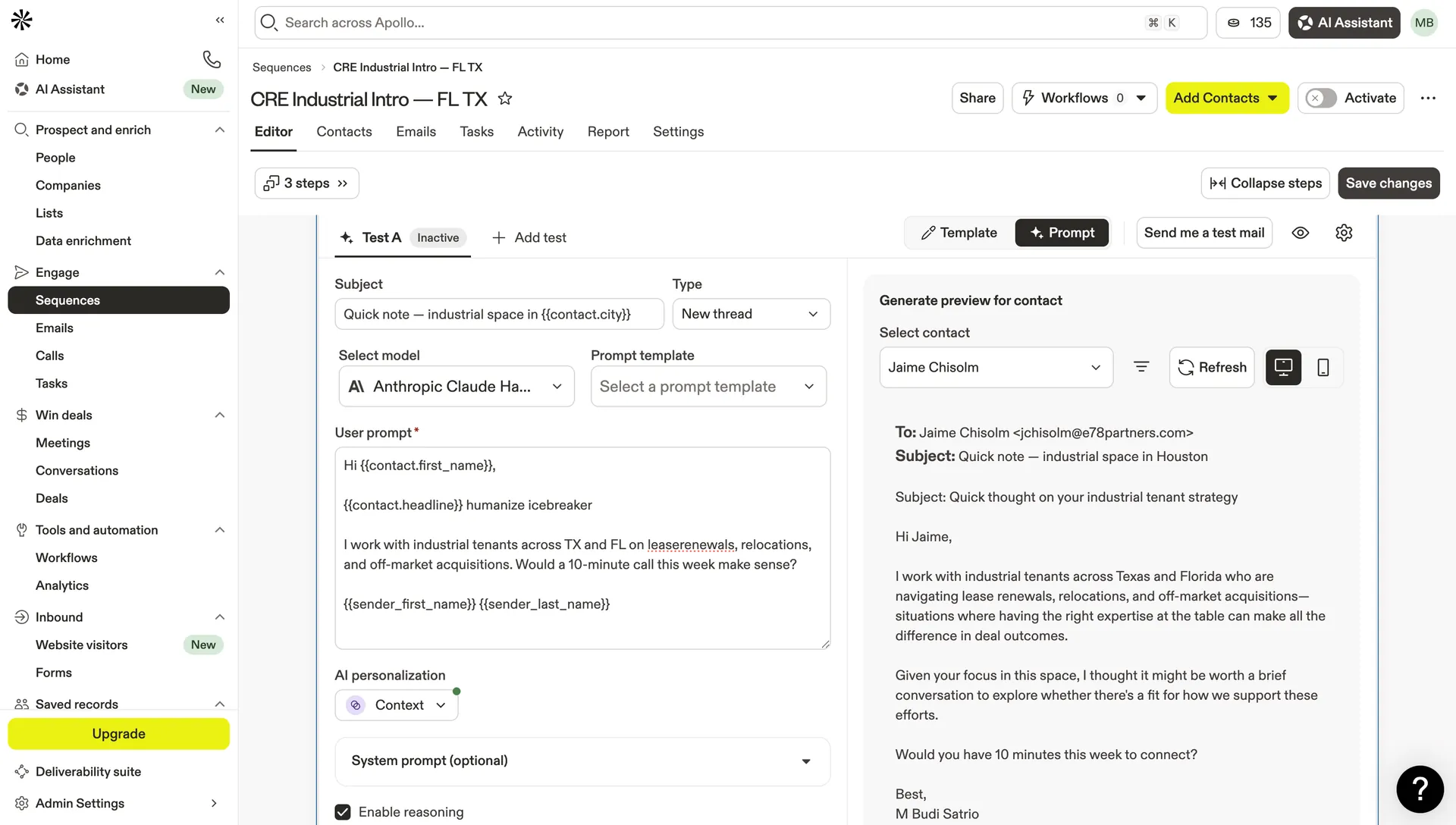
Apollo · AI Personalization · Anthropic Claude Haiku
Claude reads their headline. Claude writes the opener. You get the reply.
Model: Anthropic Claude Haiku. Prompt: {{contact.headline}} humanize icebreaker. Live preview for Jaime Chisolm shows Claude rewriting the intro based on their actual LinkedIn position — referencing lease renewals, relocations, and off-market acquisitions in Texas and Florida. No two emails are identical. No one knows it's automated.
160
ICP contacts from 1,343
15
Search filters active
3×
Touchpoints per prospect
Work Sample 02 · Master Database + CRM
Airtable The Relational Brain
A spreadsheet stores data. A database thinks about it. This Airtable base is the memory of the entire system — every company, contact, deal, and activity linked together, scored automatically, and surfaced in the right view at the right time. The broker opens their laptop on Monday and the hottest leads are already waiting.
Airtable4-Table Relational DBICP Formula Field8 Operational ViewsNative Automation · Live
❌ Before
Flat Google Sheet. Duplicate company names. No connection between contacts and deals. Manual scoring. No view of what's actually in the pipeline.
⚙️ Built
4-table relational base. ICP Score formula auto-calculates from 4 fields. 8 operational views pre-filter the right data. Automation triggers an email alert the moment a lead becomes "High Fit."
📈 Output
AI_Score, Fit_Label, and personalized Icebreaker written automatically by Make + Groq. Hot Queue ready by Monday 07:00. Pipeline Kanban shows deal stage across all markets. Automation confirmed live: 1 run on 4/20/2026.
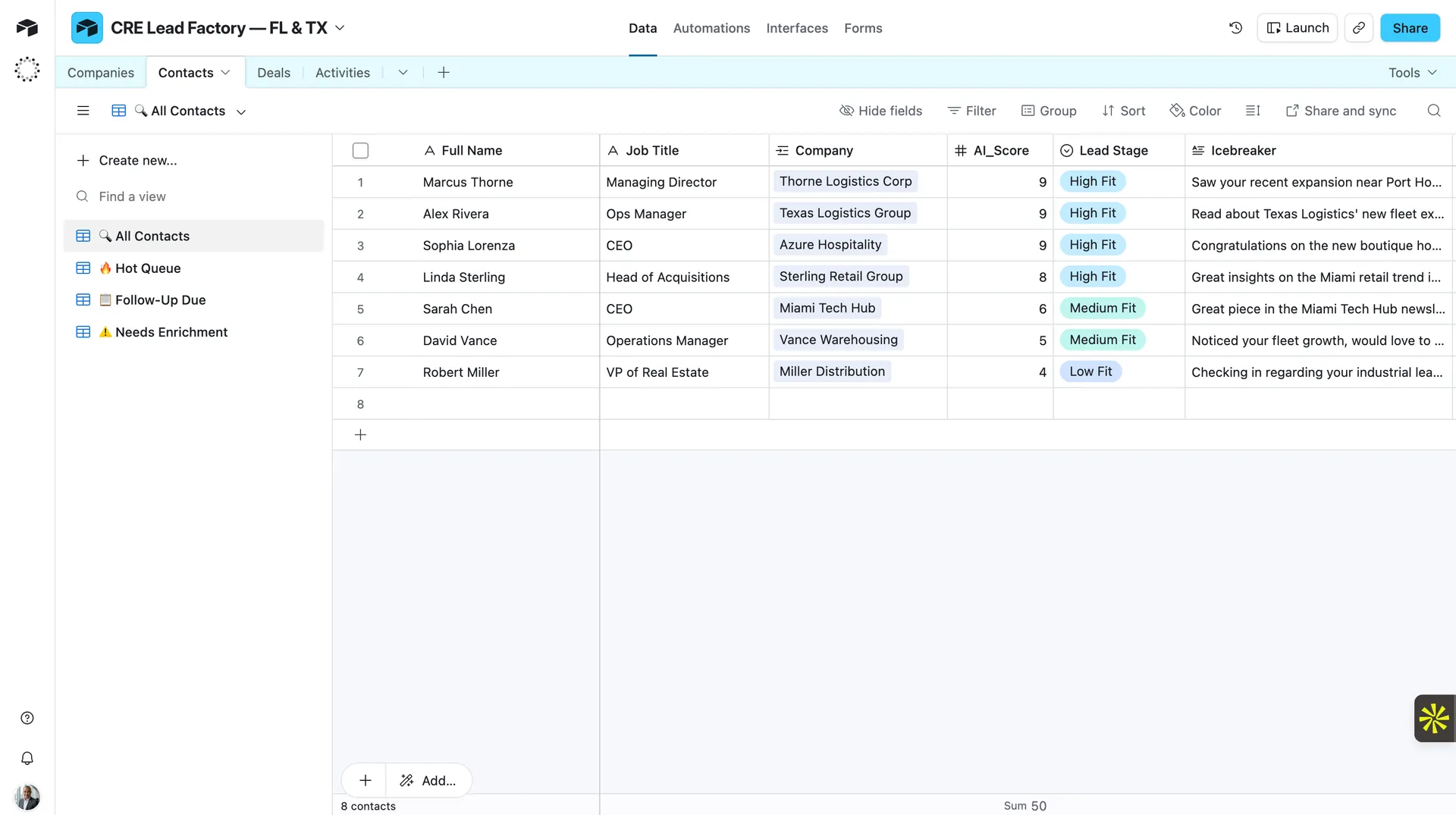
Airtable · CRE Lead Factory — FL & TX · All Contacts
Every lead scored, labeled, and armed with a personalized opener — automatically
AI_Score: 9, 9, 9, 8 (High Fit) / 6, 5 (Medium Fit) / 4 (Low Fit). Icebreaker column: unique sentence per row, written by Groq AI. Sum AI_Score = 50. Views in sidebar: 🔥 Hot Queue · 📋 Follow-Up Due · ⚠️ Needs Enrichment. All populated by Make without a single manual entry.
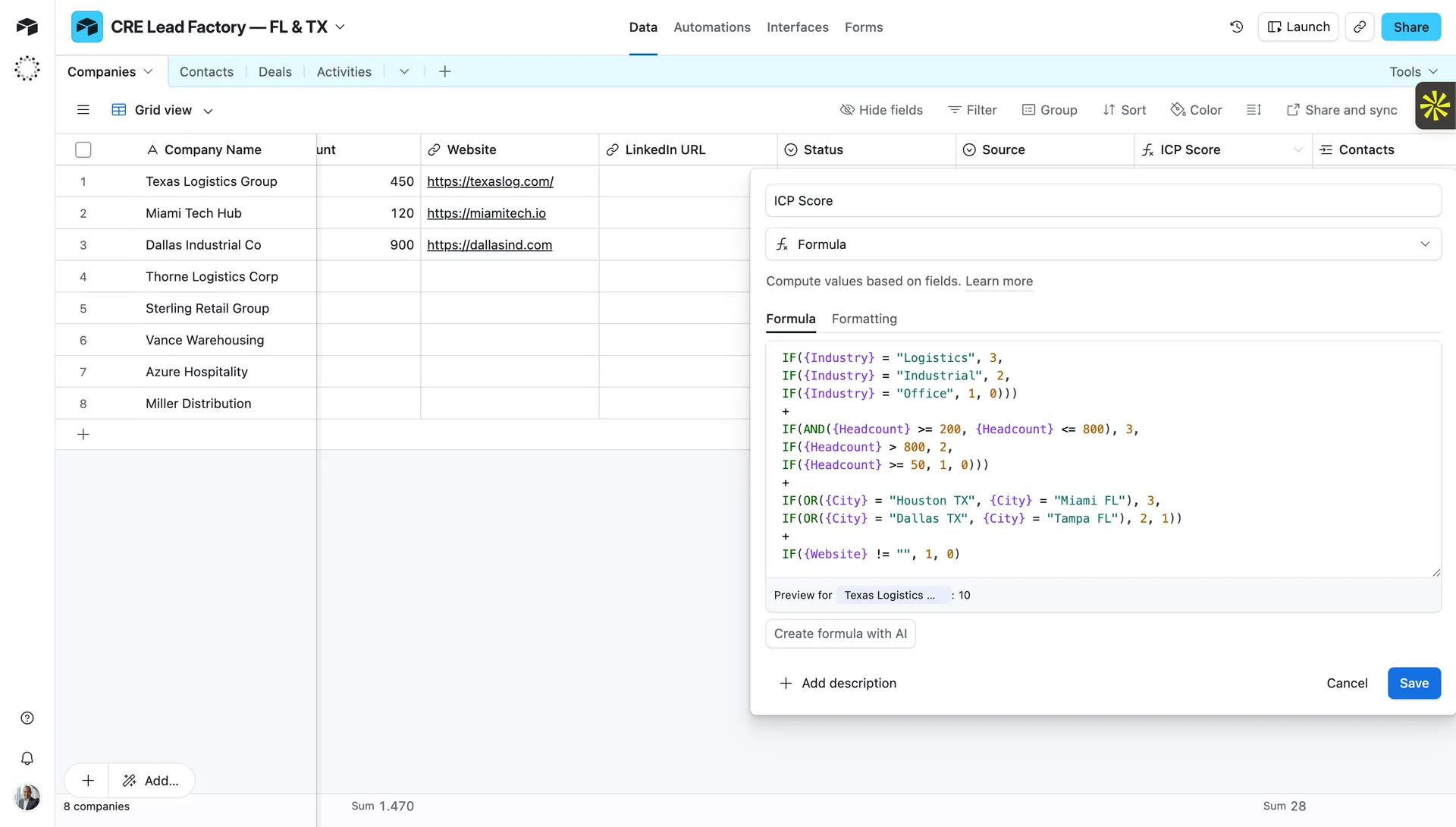
Airtable · ICP Score Formula
The formula that separates HOT from noise — without anyone touching it
Industry (Logistics=3, Industrial=2) + Headcount range (200–800=3) + City priority (Houston/Miami=3) + Website present (+1). Preview: Texas Logistics = 10/10. Recalculates instantly on every field change. Score range 3–10: ≥8 HOT · 5–7 WARM · ≤4 COLD.
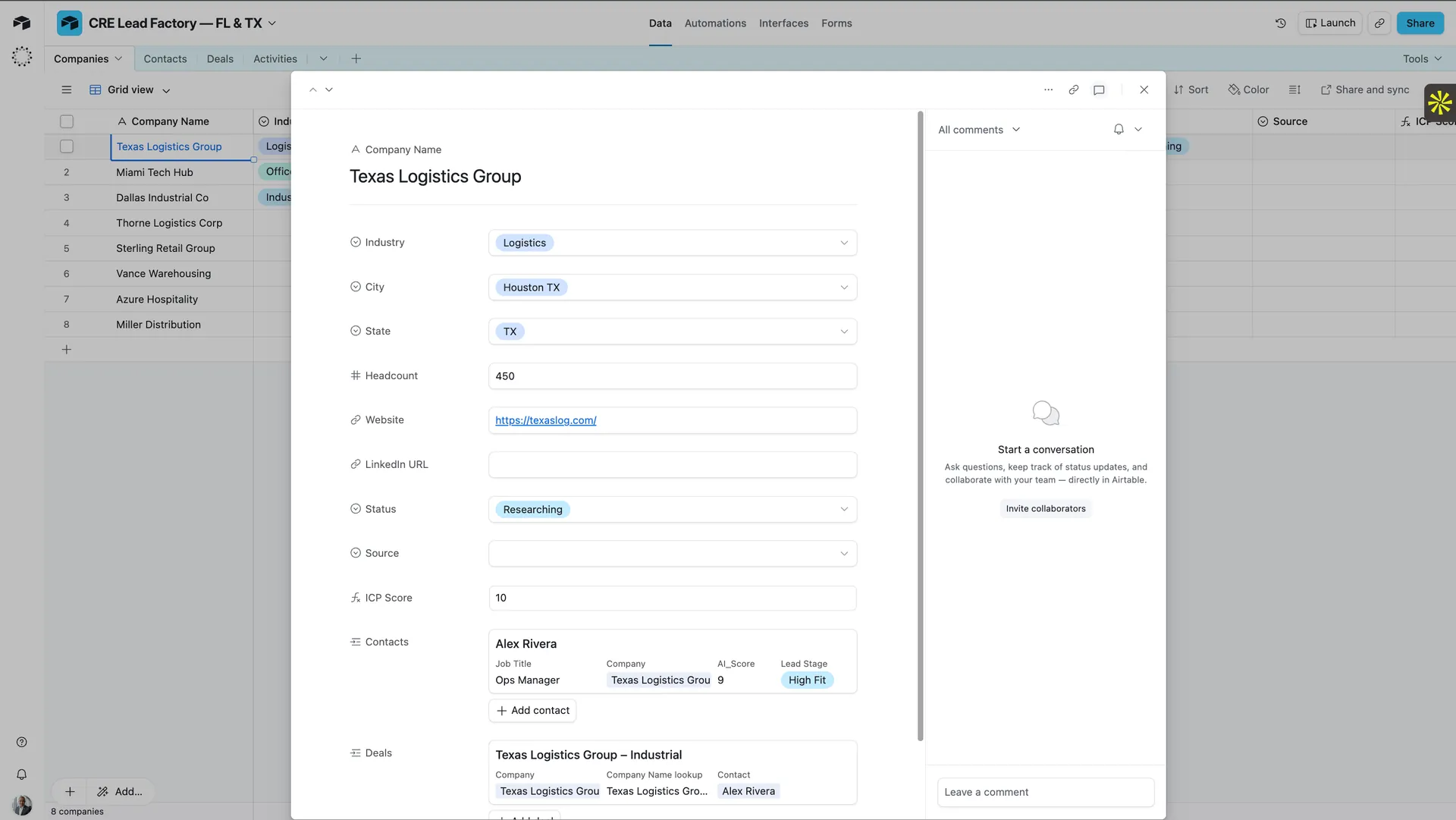
Airtable · Record Expand
Texas Logistics Group → Contact → Deal — one record, everything connected
Industry=Logistics, City=Houston TX, Headcount=450, ICP Score=10. Linked: Alex Rivera (Ops Manager, AI_Score 9, High Fit). Linked deal: Texas Logistics Group – Industrial. Change the company once — it updates across all contacts and deals. That's relational.
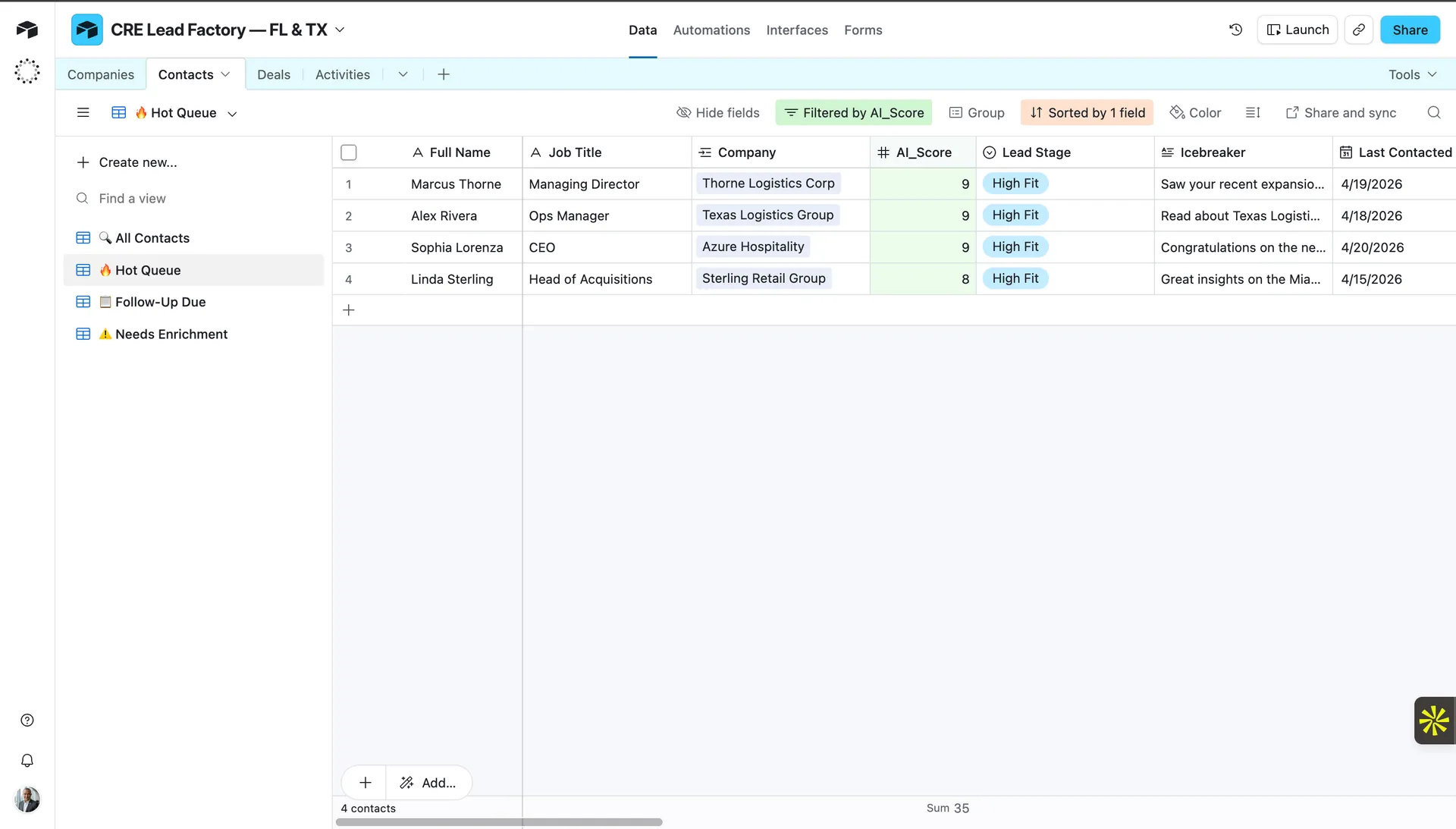
Airtable · 🔥 Hot Queue View
Monday morning: 4 High Fit leads waiting, ranked, ready to call
Filtered by AI_Score ≥ 8. Sorted descending. Icebreaker visible per row. "Filtered by AI_Score + Sorted by 1 field" — broker sees only what matters, in the right order, without touching a filter.
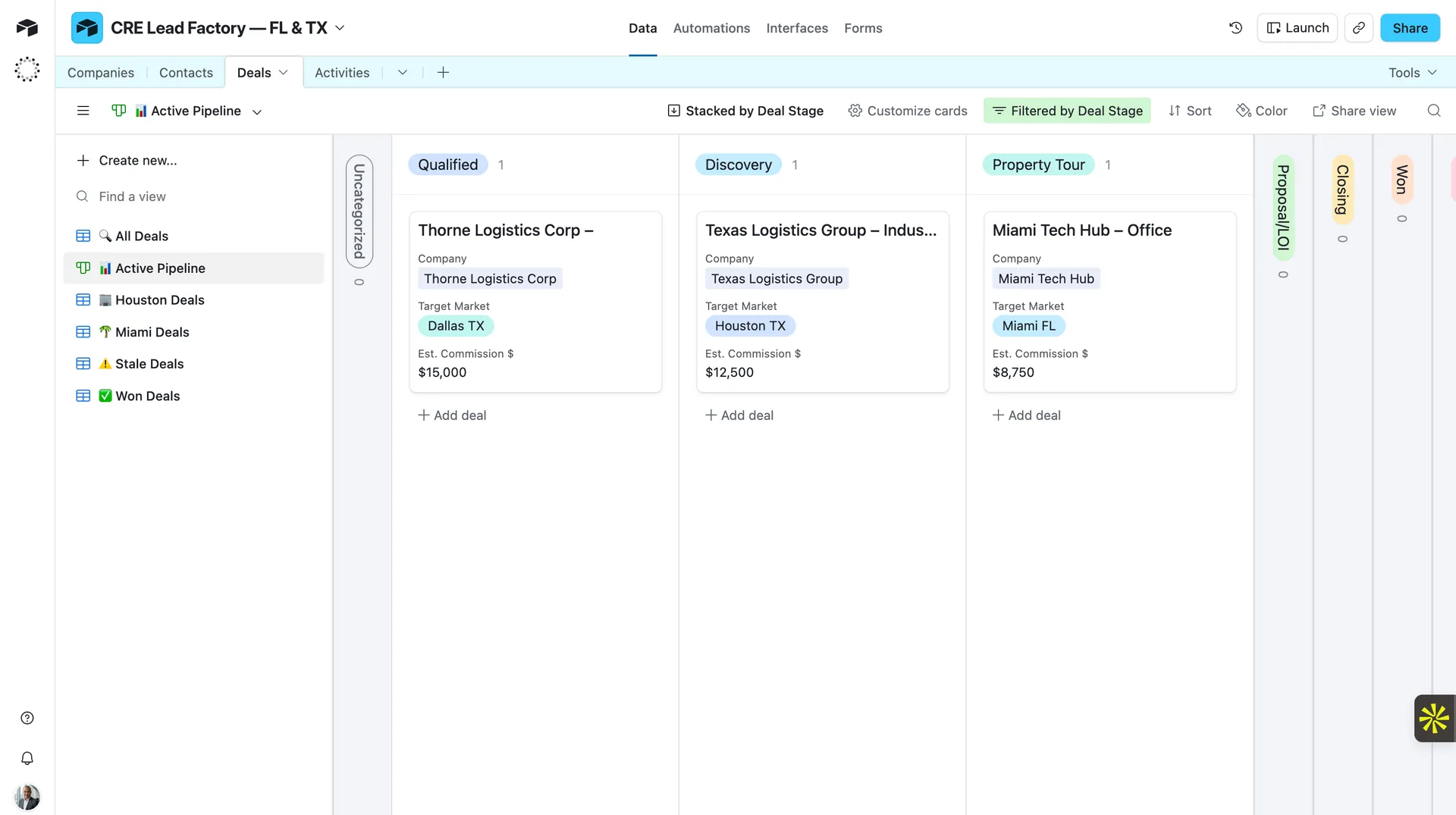
Airtable · Deals · Active Pipeline Kanban
Pipeline at a glance — no scrolling, no spreadsheet math
3 active deals across 3 stages: Qualified (Thorne Logistics, Dallas TX, $15k) · Discovery (Texas Logistics, Houston TX, $12.5k) · Property Tour (Miami Tech Hub, Miami FL, $8.75k). Views: Houston Deals · Miami Deals · ⚠️ Stale Deals · ✅ Won Deals.
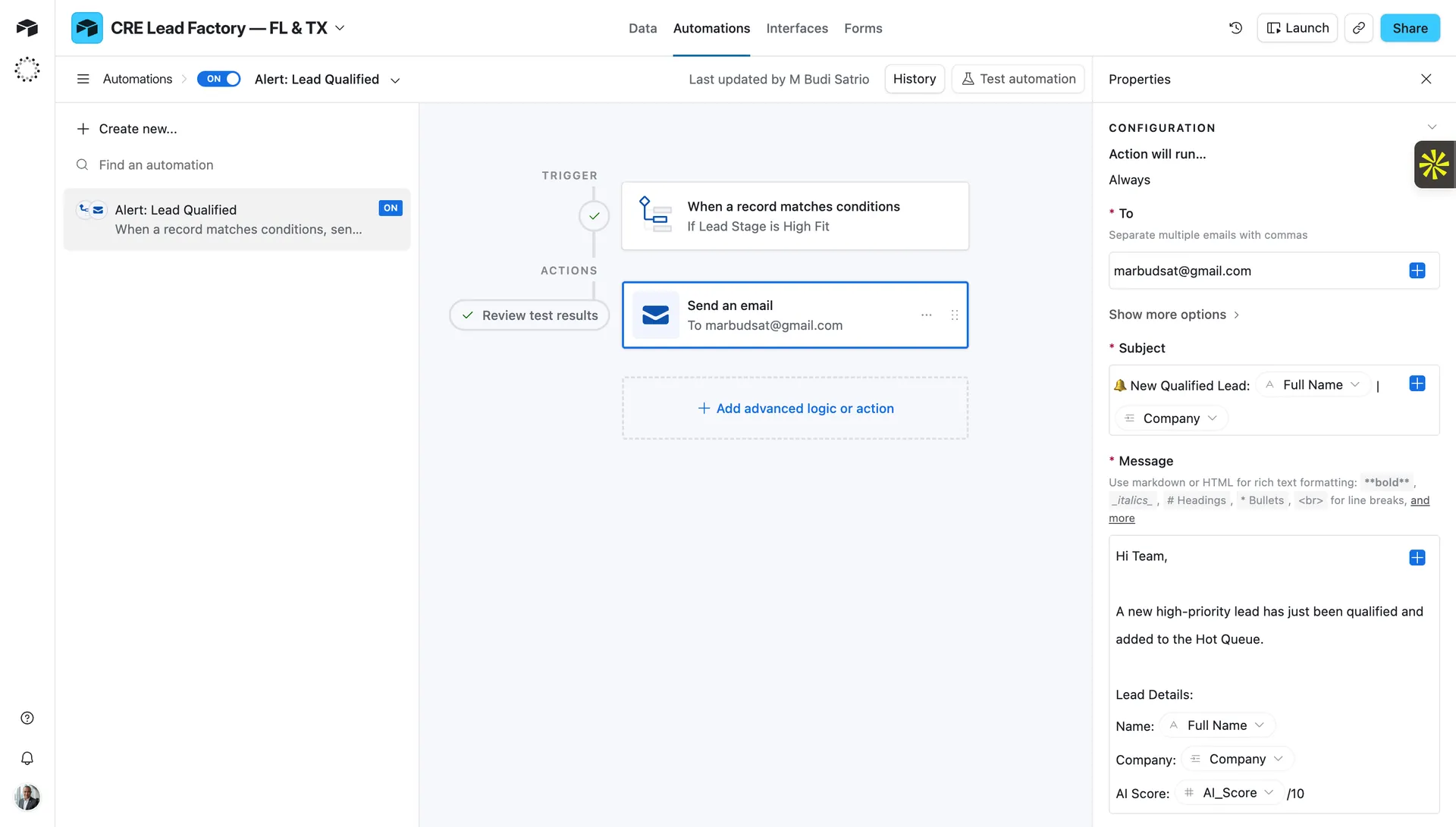
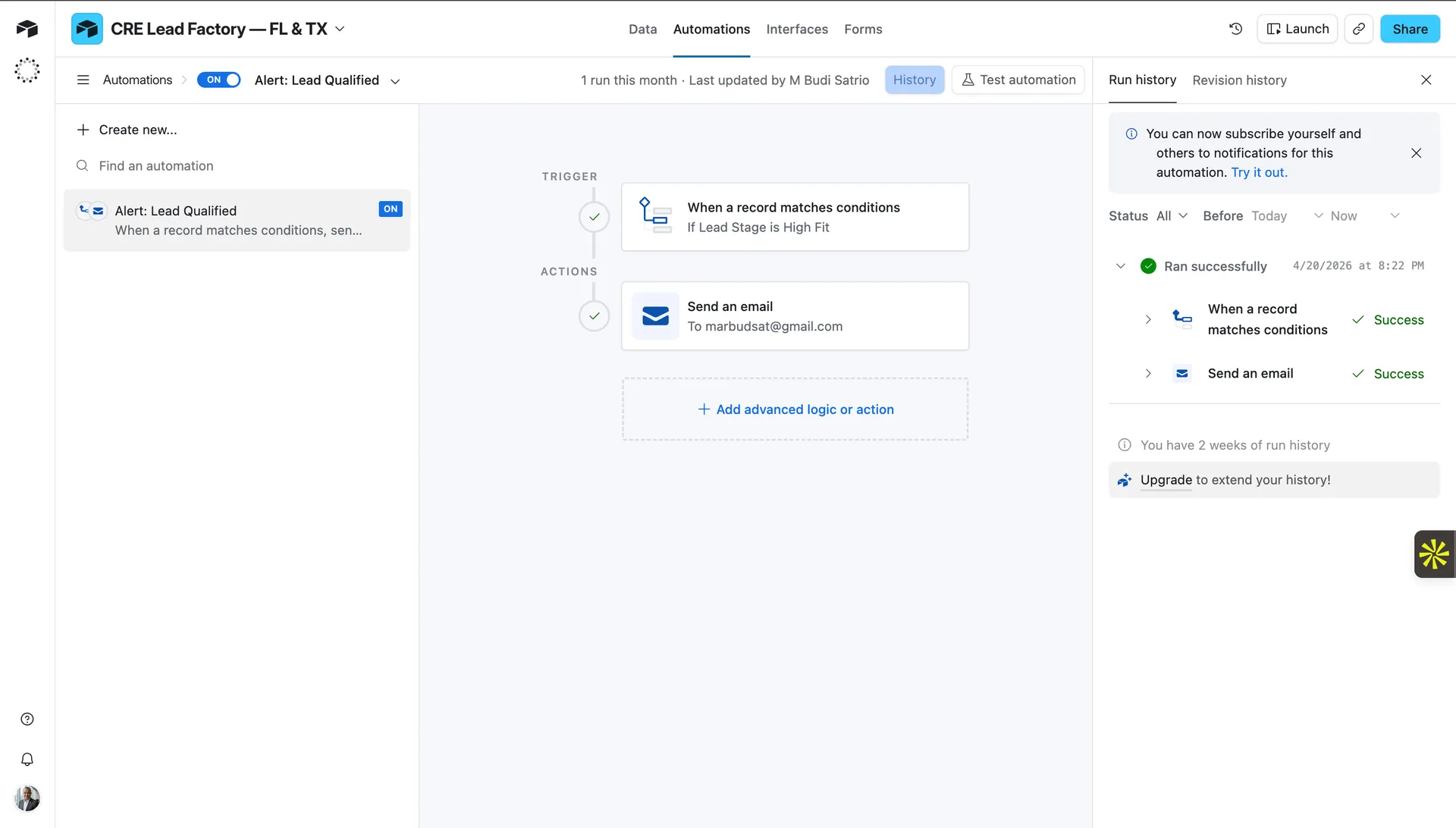
Airtable · Native Automation · ON
The moment a lead scores High Fit — your phone gets the email, not your to-do list
Trigger: Lead Stage = High Fit. Action: Send email to broker with Full Name, Company, AI_Score /10. Dynamic fields injected at the time of trigger — no manual copy-paste. Last updated by M Budi Satrio.
Airtable · Run History
Confirmed live: ran 4/20/2026 at 8:22 PM · both steps ✓ Success
"1 run this month." Not a test. Not a demo. Both steps successful: record matched condition + email sent. This system fired in production while the broker was doing something else.
4
Linked tables
8
Operational views
✓
Live automation 4/20/2026
Work Sample 03 · Automation Orchestration
Make.com 4 Scenarios. Zero Manual Work.
The automation layer that holds everything together. Four modular scenarios — each with a single job, running on schedule, doing exactly what a human would do if they worked 24/7 and never made mistakes. When a lead comes in, it gets processed. When it scores high, it gets contacted. When a deal goes cold, someone is reminded. When a deal closes, a client workspace appears.
Every tool was an island. Apollo to Airtable: manual CSV export. AI scoring: one lead at a time. Follow-up timing: whoever remembered.
⚙️ Built
4 named scenarios under "Case Study" folder: 01 Lead Ingestion → 02 AI Scoring → 03 Automated Outreach → 04 Daily Monitor. Modular architecture — each scenario has one job. Failure in one never breaks another.
📈 Output
Scenario 01: 20 ops → 4 deduplicated new records per run. Scenario 02: Groq returned score 83, label "High Fit", icebreaker — live. Scenario 03: Auto outreach + follow-up drip. Scenario 04: Daily stale deal alert at 08:00.
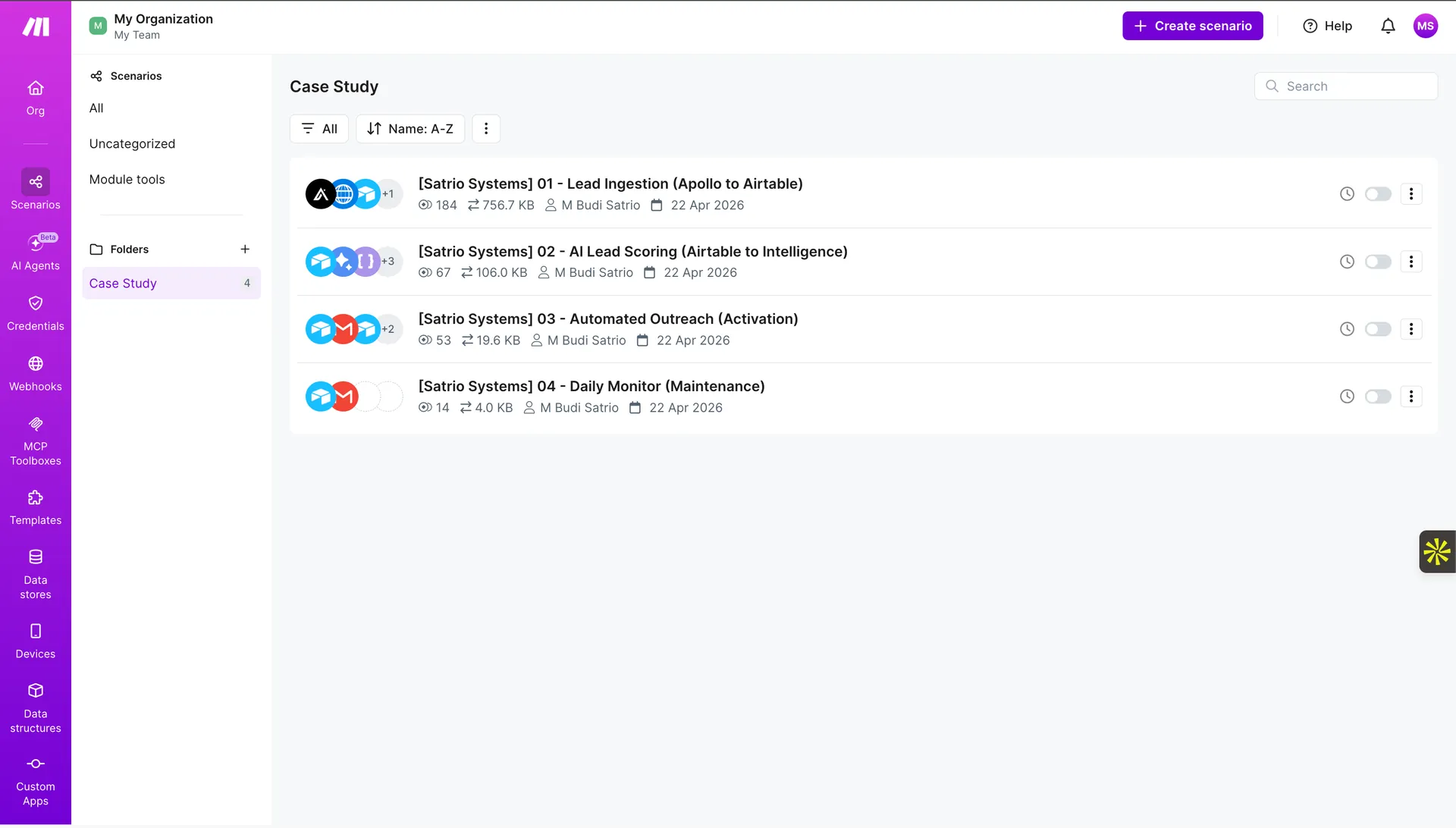
Make · Case Study Folder · All 4 Scenarios
4 scenarios. 4 jobs. One system that runs itself.
Folder "Case Study" — 4 named scenarios created 22 Apr 2026 by M Budi Satrio: [Satrio Systems] 01 Lead Ingestion (184 ops · 756.7KB) · 02 AI Lead Scoring (67 ops · 106KB) · 03 Automated Outreach (53 ops · 19.6KB) · 04 Daily Monitor (14 ops · 4KB). Total operations across all scenarios visible at a glance.
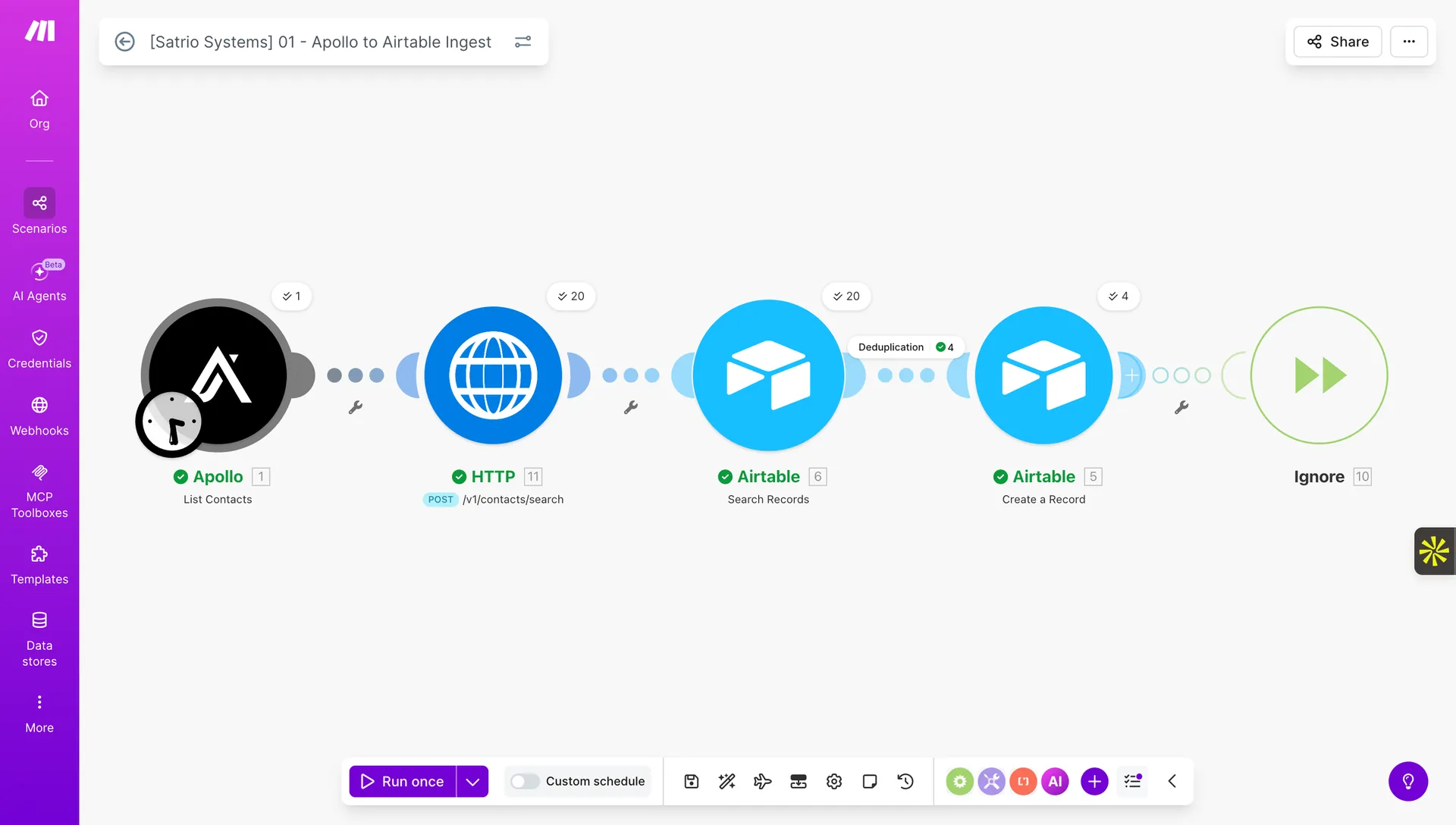
5 modules. Apollo (✓1) → HTTP POST /v1/contacts/search (✓20) → Airtable Search Records [Deduplication ✓4] → Airtable Create (✓4 new) → Ignore (10 already existed). Every lead checked before insert — zero duplicates.
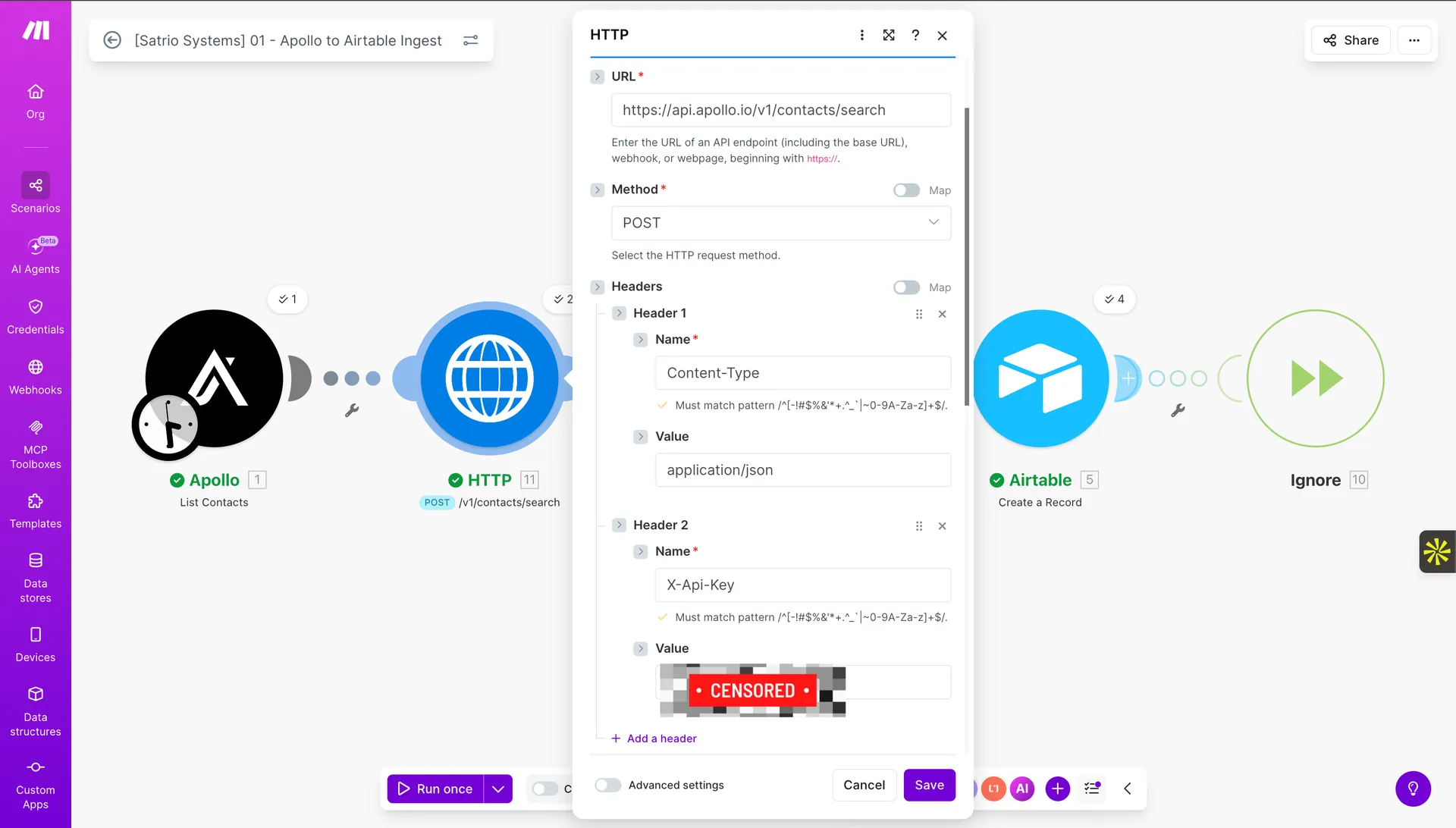
Scenario 01 · HTTP Module Config
API authentication — the connection that makes everything possible
URL: https://api.apollo.io/v1/contacts/search · Method: POST · Header 1: Content-Type=application/json · Header 2: X-Api-Key=[CENSORED — live key]. This module is the bridge between Make and Apollo's contact database.
Scenario 02 · AI Lead Scoring · Every 15 Minutes
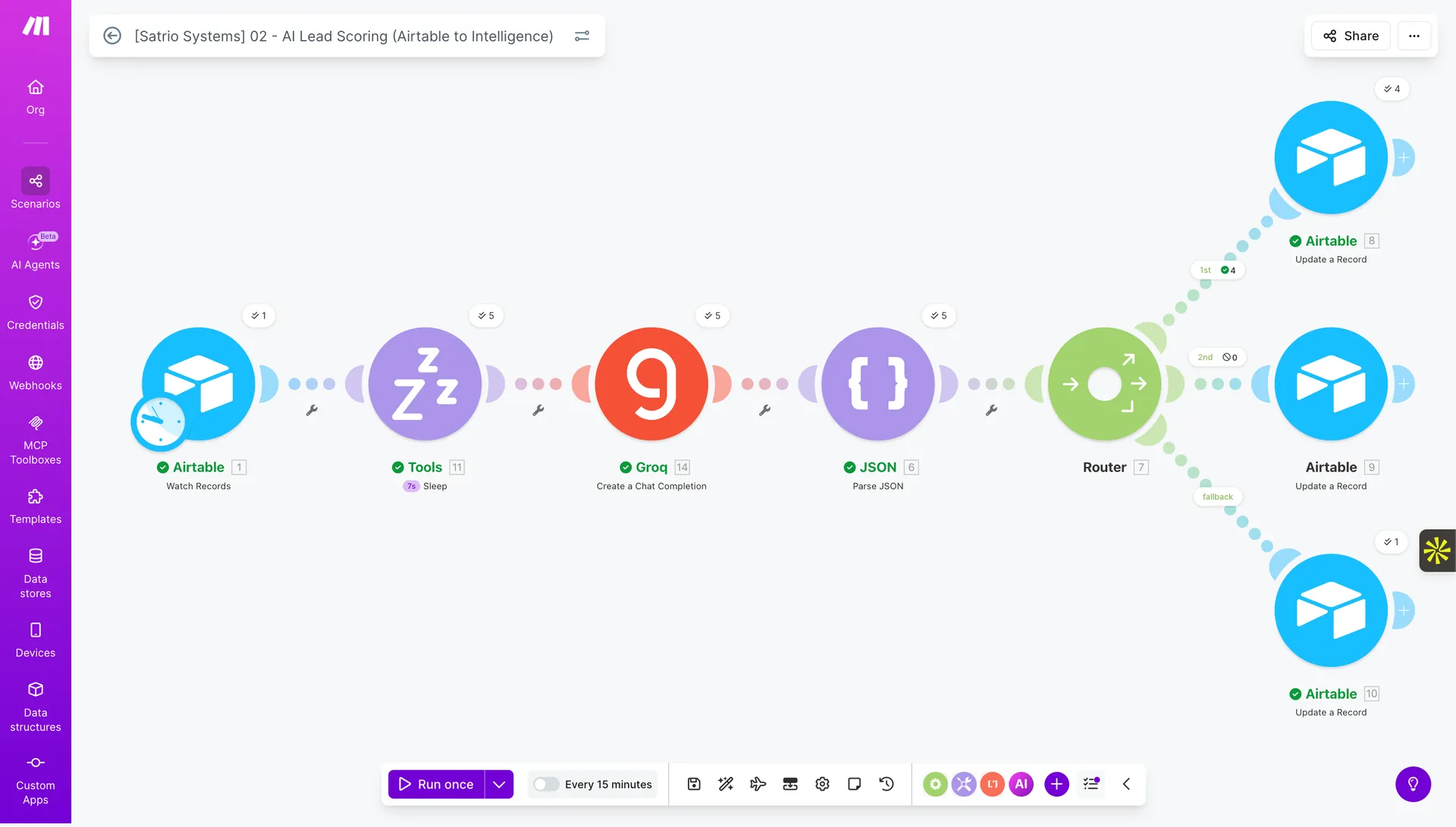
Airtable Watch → Sleep → Groq AI → JSON Parse → Router → 3 paths · runs every 15 minutes
The intelligence engine: Airtable Watch Records (✓1) → Tools Sleep (✓11 rate-limit protection) → Groq Create Chat Completion (✓14) → JSON Parse (✓6) → Router (✓7) → Airtable Update: 1st path High Fit (✓4 records) · 2nd path Medium Fit (0) · fallback (✓1). The router fan-out is conditional routing — each lead takes a different path based on its AI score.
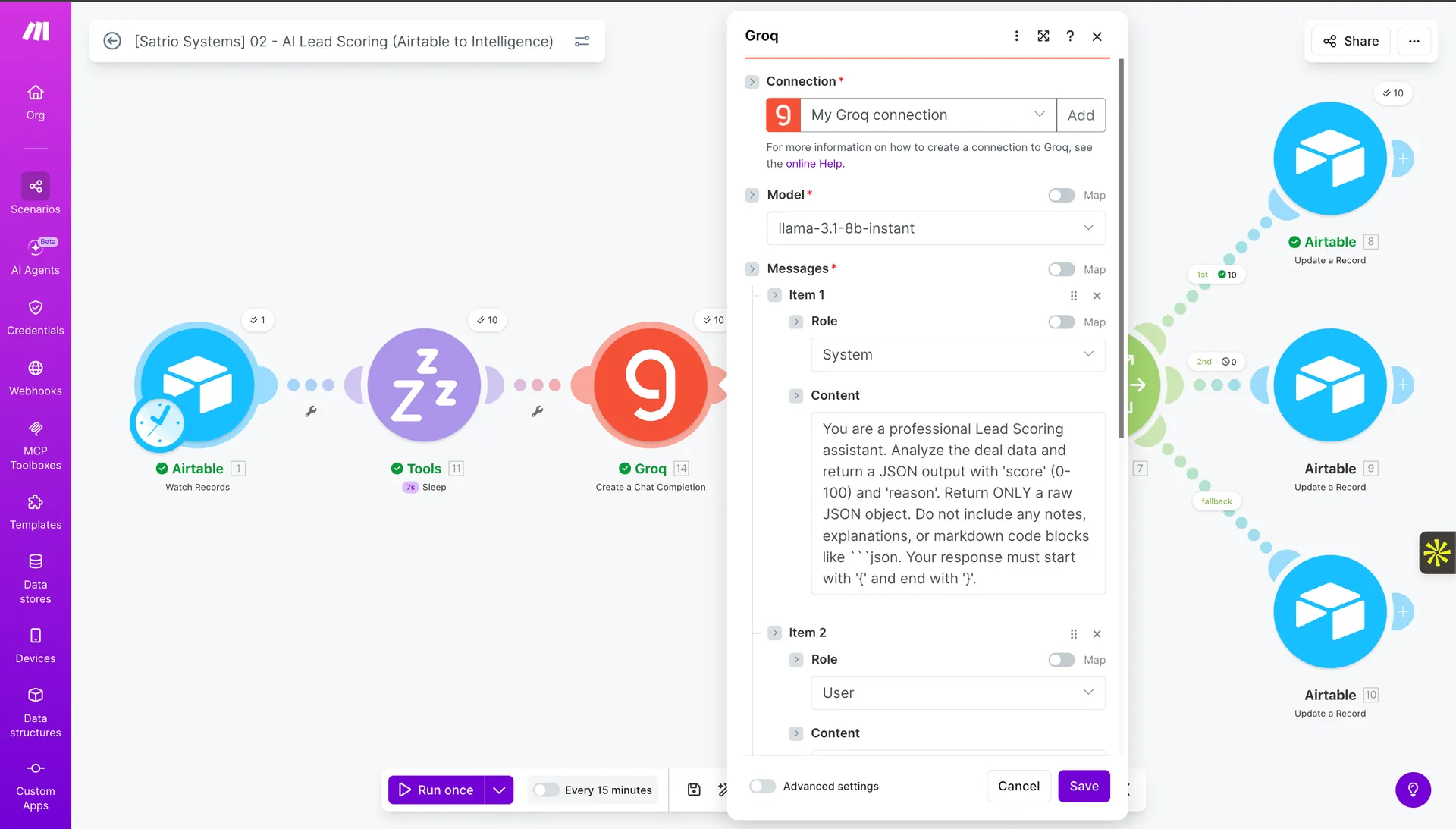
Groq · System Prompt
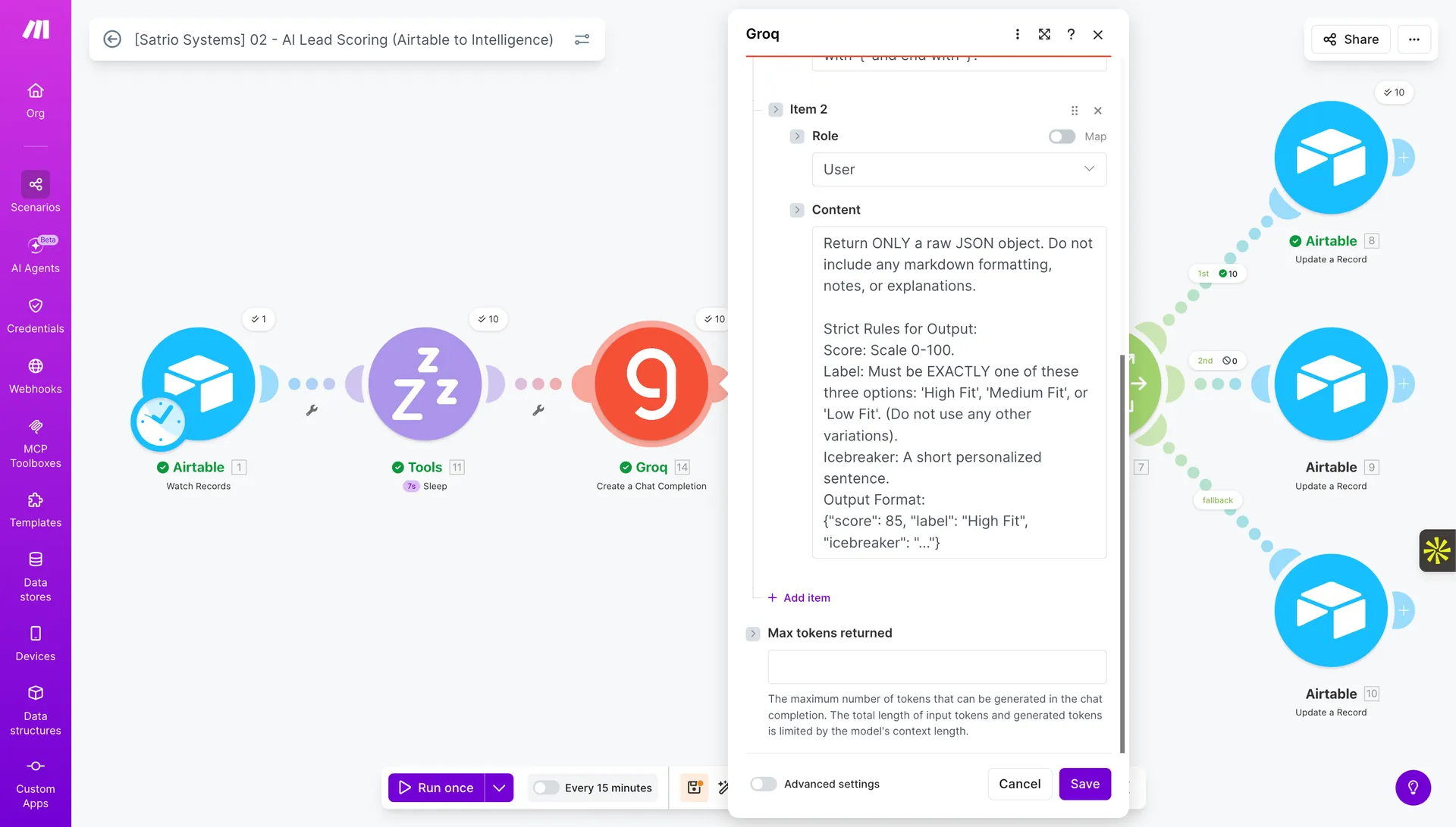
JSON only. No markdown. Starts with { ends with }.
llama-3.1-8b-instant. System: return raw JSON, no code blocks. Prevents parse failures downstream.
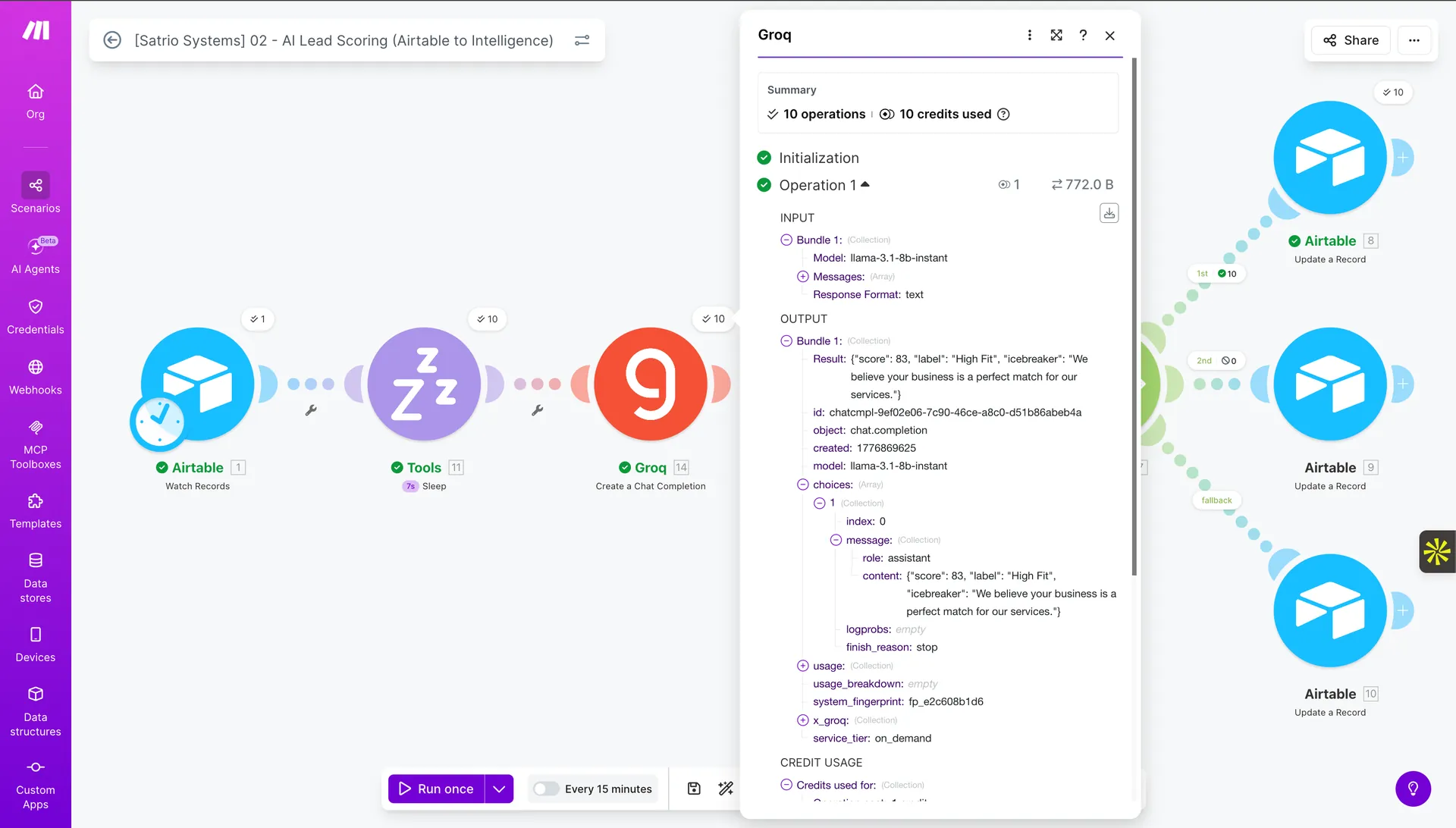
Result: {"score":83,"label":"High Fit","icebreaker":"We believe your business is a perfect match for our services."} — raw JSON, no wrapper. Written to Airtable immediately.
Scenario 03 · Automated Outreach · Every 15 Minutes
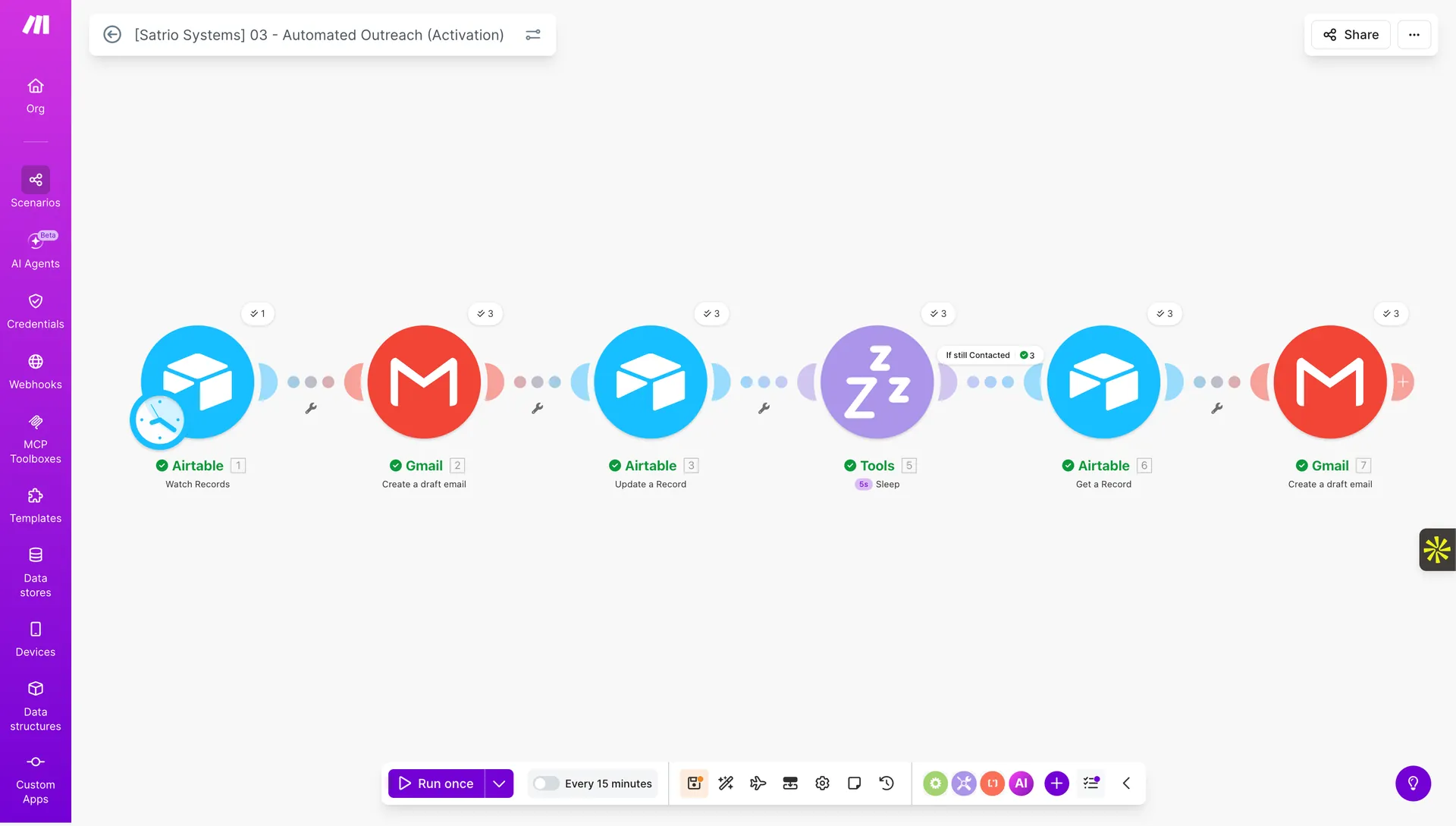
Airtable Watch → Gmail draft → Update Record → Sleep → Check status → Follow-up draft
7-module outreach drip: Airtable Watch Records (✓1) → Gmail Create draft email (✓3) → Airtable Update a Record (✓3) → Tools Sleep [5s] (✓3) → Airtable Get a Record (✓3) — "If still Contacted" conditional path → Gmail Create a draft email (✓3). First email goes out. Five seconds later, system checks if they replied. If not — follow-up draft queued automatically.
Scenario 04 · Daily Monitor · 08:00 Every Day
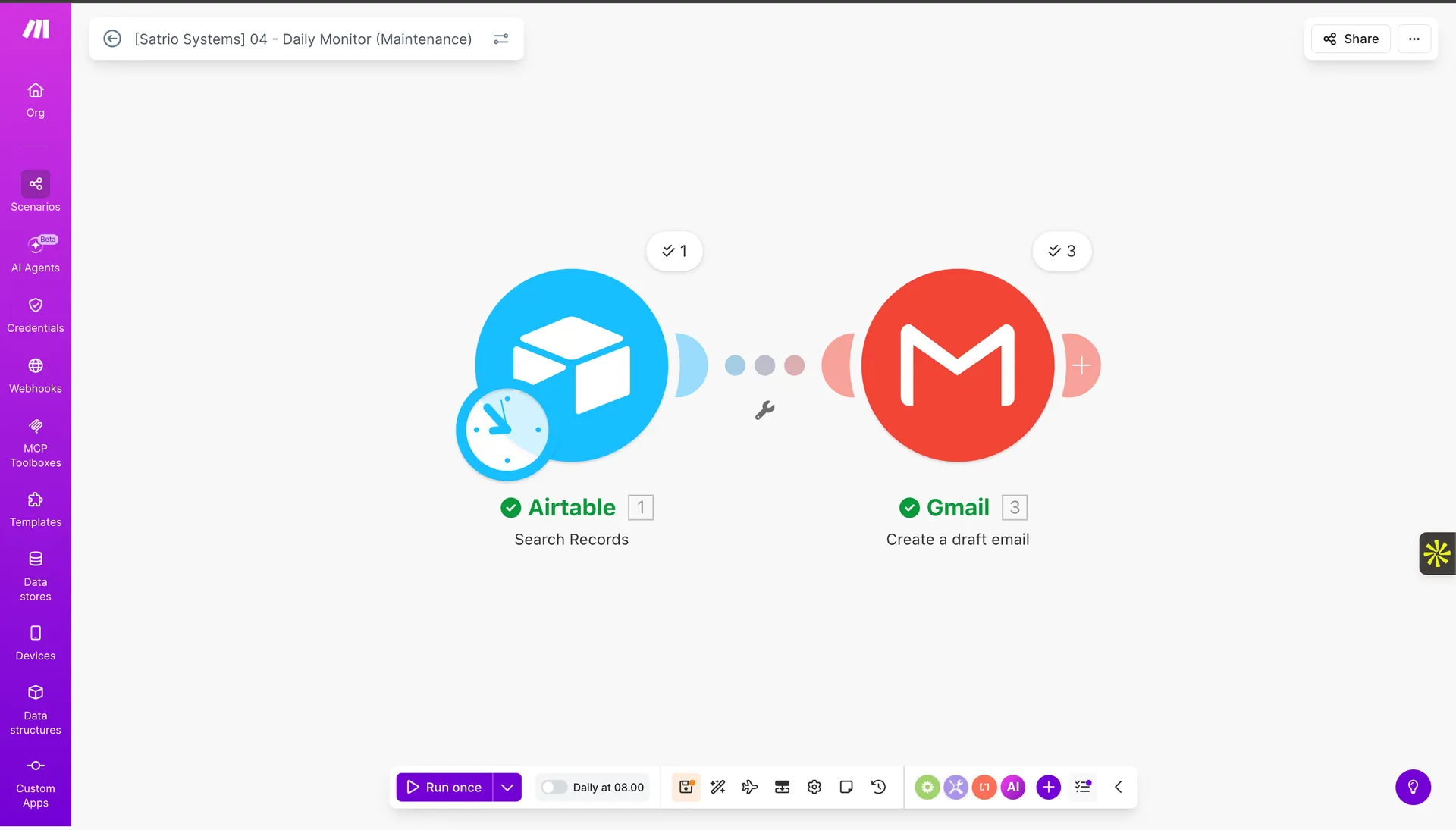
Airtable Search stale deals → Gmail draft alert — every morning at 08:00
2-module scenario: Airtable Search Records (✓1 — finds deals inactive for 7+ days) → Gmail Create a draft email (✓3 — one draft per stale deal). Schedule: Daily at 08:00. Broker's inbox surfaces which deals need attention before the workday starts.
Why 4 separate scenarios instead of one big one: When Scenario 02 (AI Scoring) fails, Scenario 01 (Ingestion) keeps running. When Scenario 03 (Outreach) is paused for editing, Scenario 04 (Monitor) still fires at 08:00. Modular architecture means partial failures, not total outages — and debugging one scenario never touches the others.
Airtable is the database. Pipedrive is the cockpit. When a lead scores High Fit in Airtable, a deal is created in Pipedrive — with the AI score, icebreaker, and Airtable Record ID already in the custom fields. When a deal goes cold for 7 days, Pipedrive creates a follow-up call activity automatically. And when a deal stage changes, a webhook fires to Make — which updates Airtable. Two systems. One truth.
PipedriveCRE Deals Pipeline · 5 stagesCustom Fields (AI Score · Icebreaker)Native Automation · Stale DealWebhook → Make · Status 200
❌ Before
CRM was a contacts list, nothing more. No pipeline stages. No custom fields. No idea which deals were going stale. No connection back to the automation stack.
⚙️ Built
Custom "CRE Deals Pipeline" with 5 CRE-specific stages. 7 custom fields including AI Score, Icebreaker, and Airtable Record ID. Stale Deal automation fires at 09:00 WIB 7 days after last activity. Webhook registered to Make with confirmed 200 response.
📈 Output
4 live deals across 4 stages ($1.5k → $37.5k). Deal detail shows AI Score=85 and Icebreaker populated from Airtable. Insights bar chart visualizes pipeline value by stage. Webhook last fired Apr 20, 2026 at 5:18 PM — Status 200.
Pipedrive · CRE Deals Pipeline · Kanban
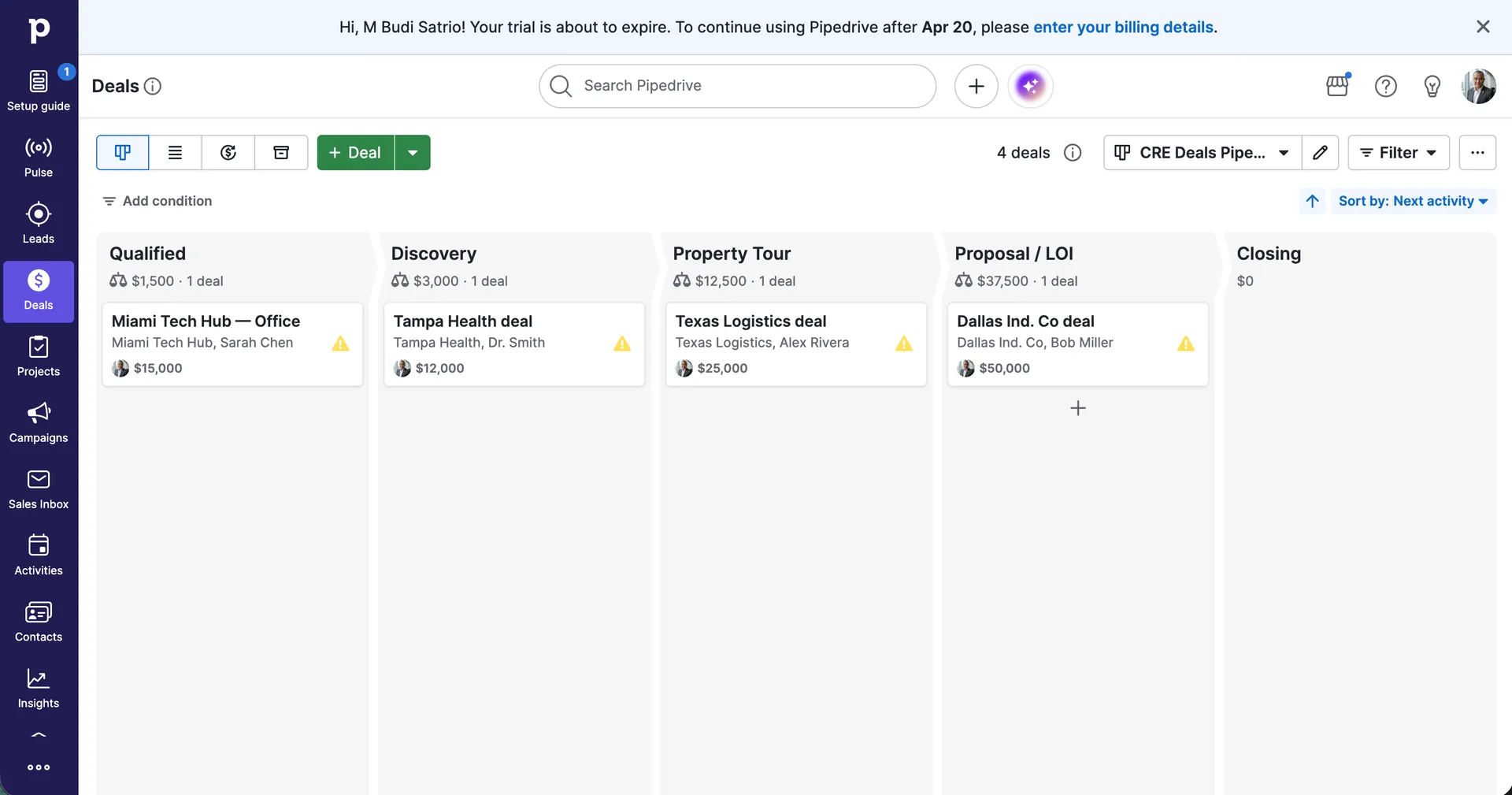
4 deals. 4 stages. $0 to $37.5k — all moving forward.
Pipeline: CRE Deals Pipe... 4 deals total. Qualified: Miami Tech Hub Office ($15k, Sarah Chen) · Discovery: Tampa Health deal ($12k, Dr. Smith) · Property Tour: Texas Logistics deal ($25k, Alex Rivera) · Proposal/LOI: Dallas Ind Co deal ($50k, Bob Miller). 5 stages configured: Qualified → Discovery → Property Tour → Proposal/LOI → Closing.
Pipedrive · Deal Detail · Custom Fields
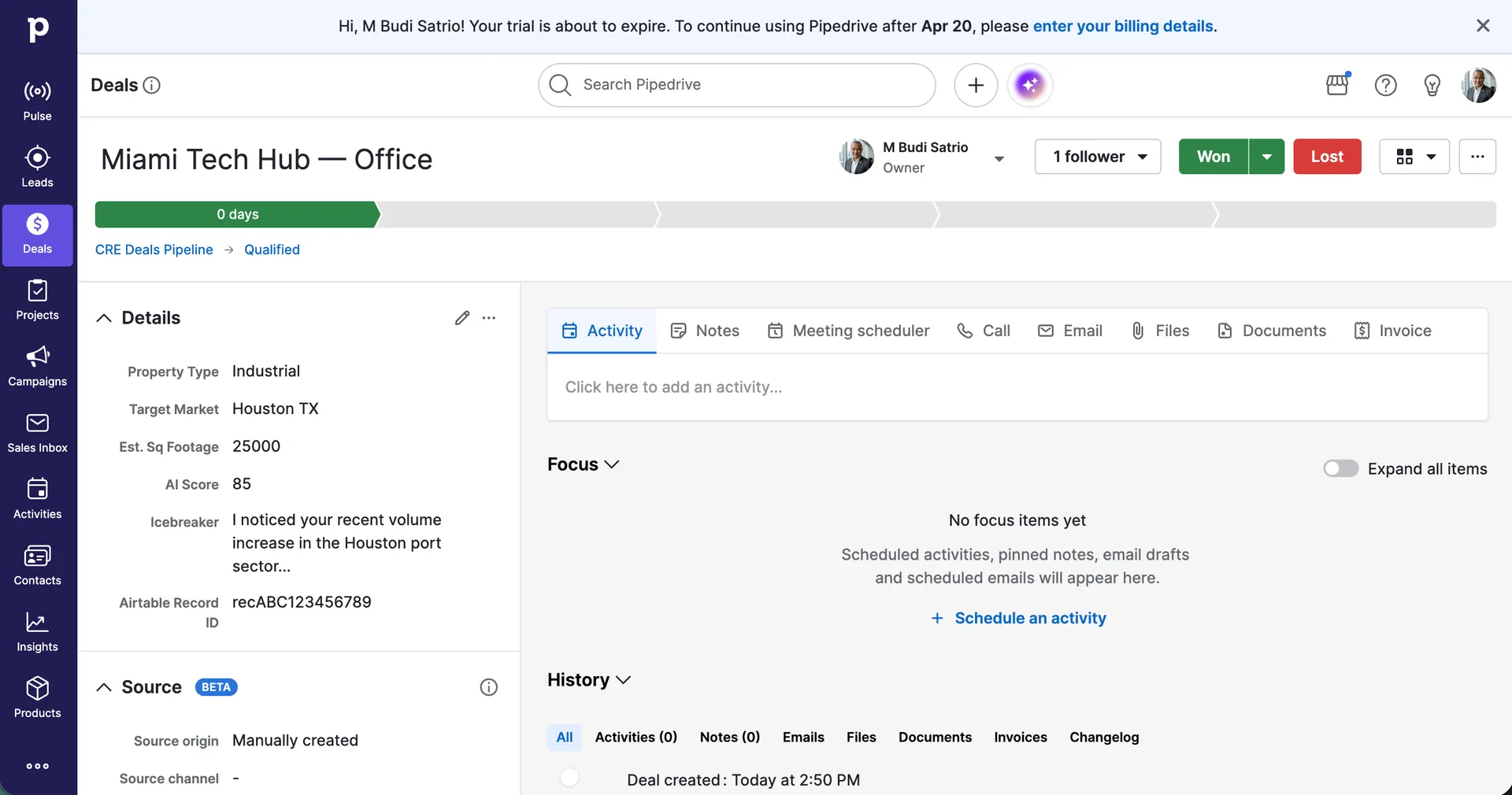
AI Score and Icebreaker live inside Pipedrive — synced from Airtable
Deal: Miami Tech Hub — Office. Owner: M Budi Satrio. Pipeline: CRE Deals Pipeline → Qualified. Custom fields: Property Type=Industrial · Target Market=Houston TX · Est. Sq Footage=25,000 · AI Score=85 · Icebreaker="I noticed your recent volume increase in the Houston port sector..." · Airtable Record ID=recABC123456789. Deal created today at 2:50 PM.
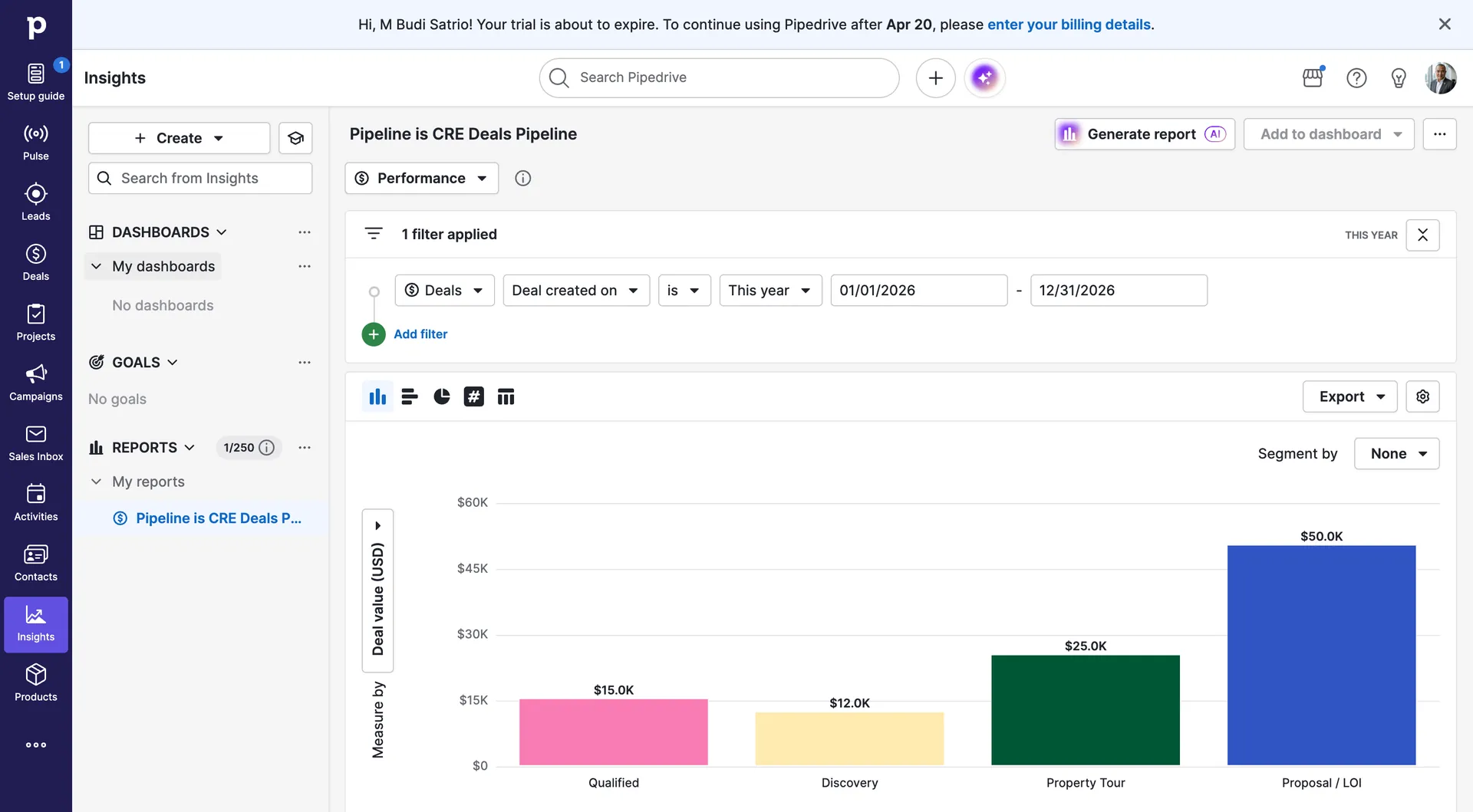
Pipedrive · Insights · Pipeline Report
Pipeline value by stage — $15k rising to $50k at Proposal/LOI
Report "Pipeline is CRE Deals Pipeline." Performance view. Filter: Deal created on = This year (01/01/2026 – 12/31/2026). Bar chart: Qualified $15k · Discovery $12k · Property Tour $25k · Proposal/LOI $50k. Total pipeline: $102.5k in 4 deals.
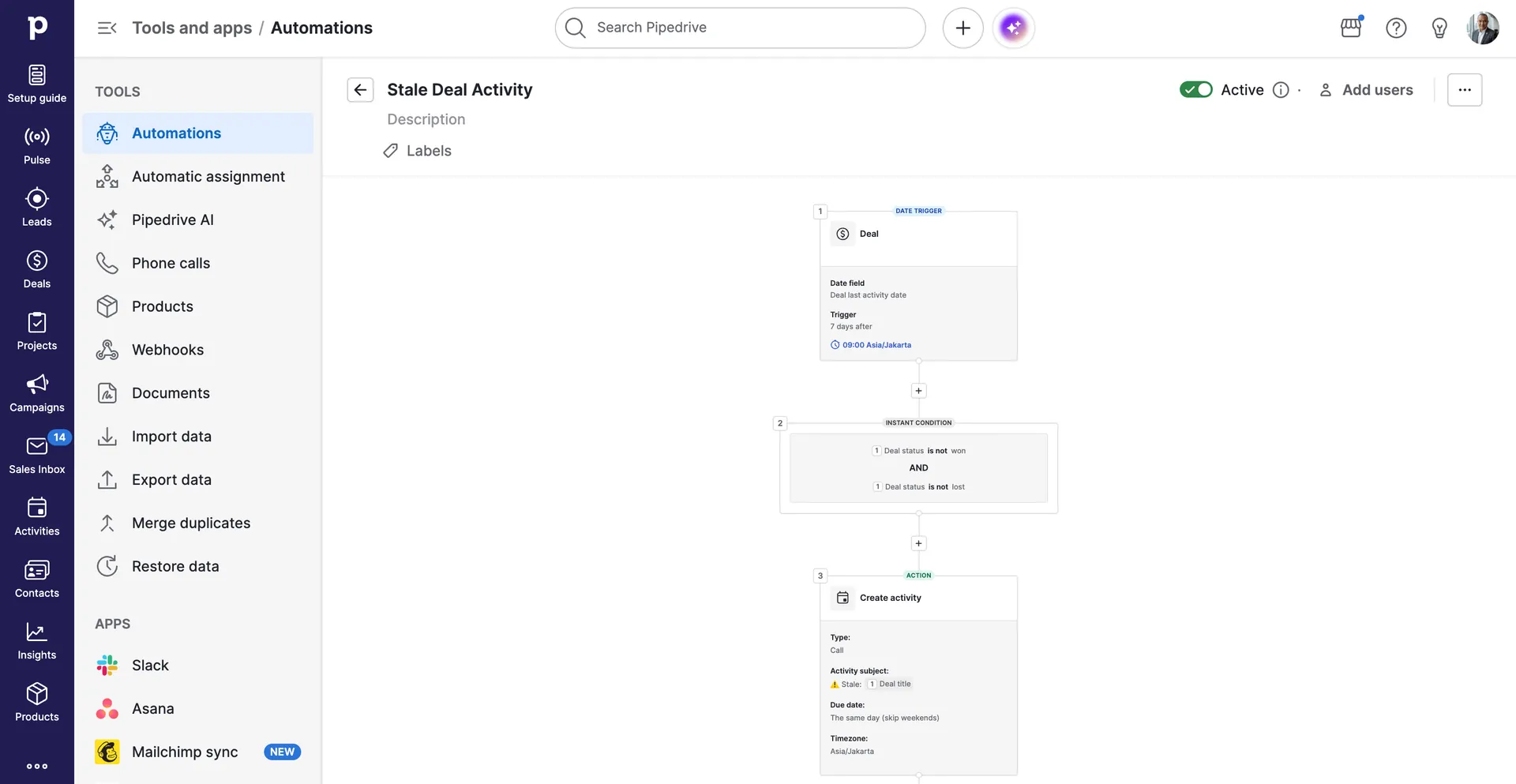
Pipedrive · Automation · Stale Deal Activity · Active
7 days of silence → automatic call task. No deal falls through the cracks.
Date trigger: Deal last activity date + 7 days after, 09:00 Asia/Jakarta. Condition: Deal status is not won AND not lost. Action: Create activity — Type: Call · Subject: ⚠️ Stale + [Deal title] · Due: same day (skip weekends) · Timezone: Asia/Jakarta. Automation status: Active.
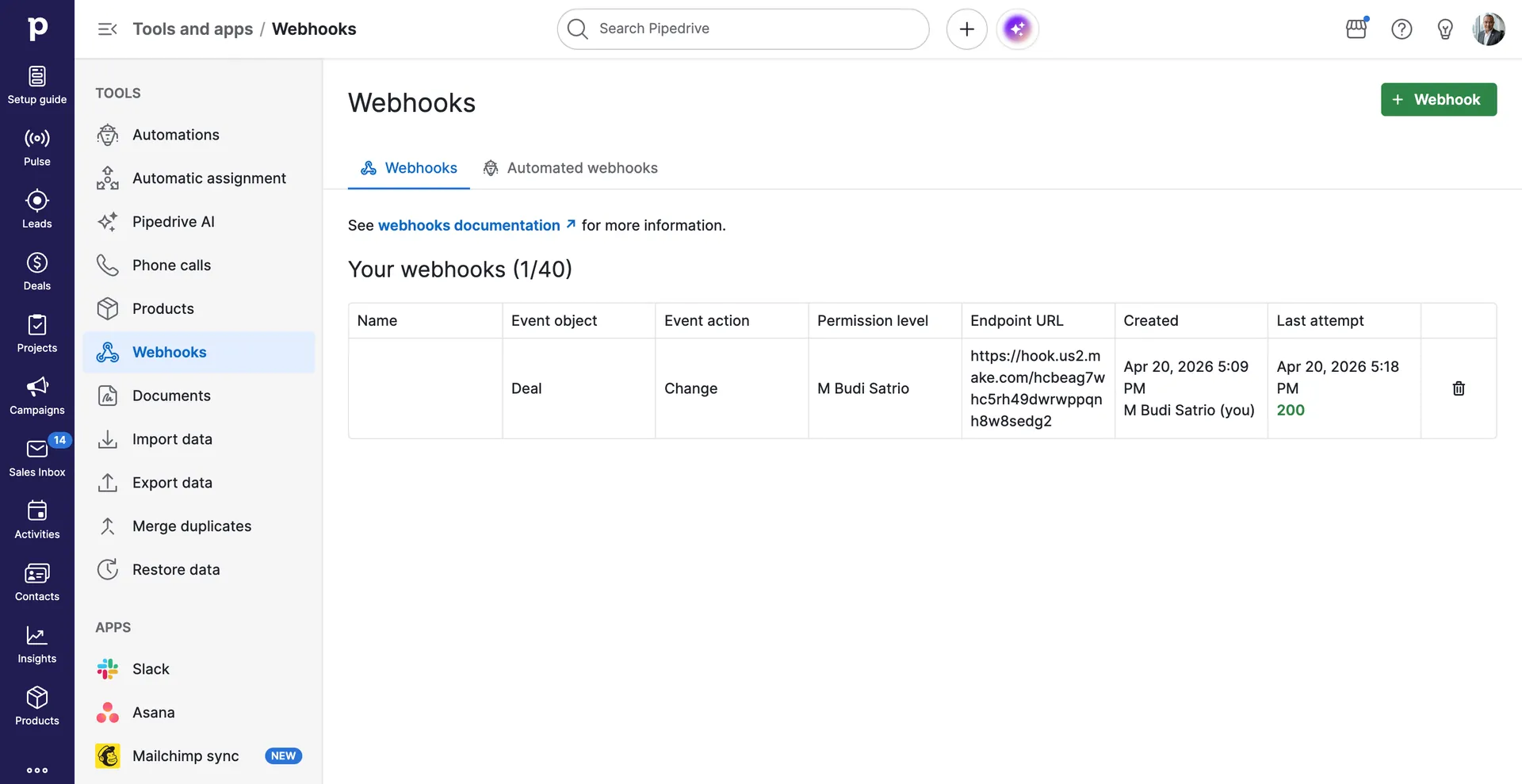
Event object: Deal · Event action: Change · Permission: M Budi Satrio · Endpoint URL: https://hook.us2.make.com/hcbeag7w... · Created: Apr 20, 2026 5:09 PM · Last attempt: Apr 20, 2026 5:18 PM · Status: 200. Every stage change in Pipedrive travels back to Airtable automatically via this webhook.
5
CRE pipeline stages
$102k
Live pipeline value
200
Webhook status — confirmed
Work Sample 05 · Client Delivery System
ClickUp The Deal Won. Now What?
Most systems die the moment a deal closes. This one accelerates. The instant Pipedrive marks a deal Won, Make triggers a webhook — and ClickUp builds a complete client workspace: folder named after the company, four task lists, onboarding tasks assigned, and custom fields pre-filled with deal value, market, and Pipedrive Deal ID. The broker's team is ready before they finish the handshake call.
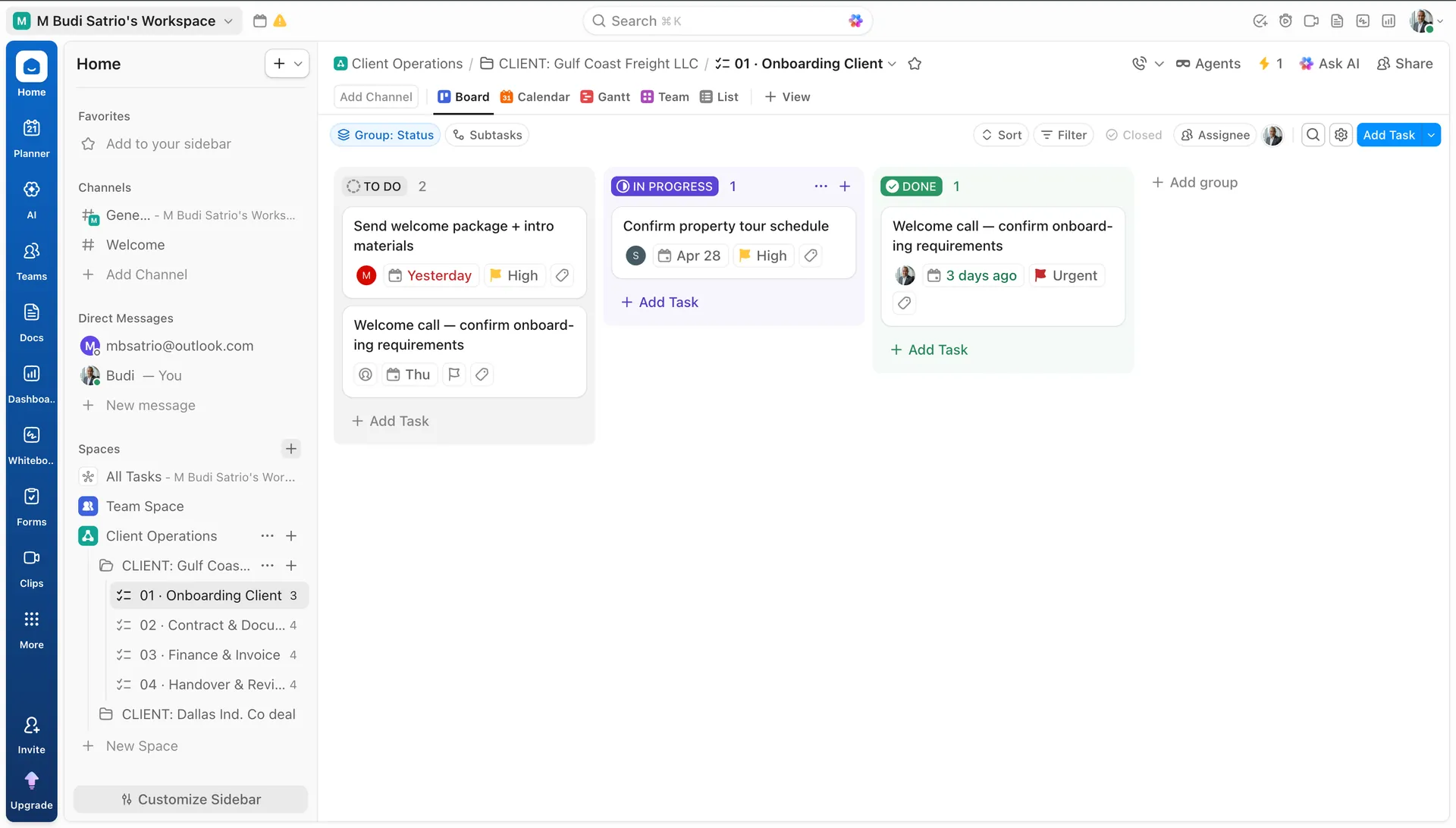
TO DO · IN PROGRESS · DONE — the broker's team always knows what's next
Board view. TO DO (2): "Send welcome package + intro materials" (Yesterday, High, assignee M) + "Welcome call — confirm onboarding requirements" (Thu). IN PROGRESS (1): "Confirm property tour schedule" (Apr 28, High). DONE (1): "Welcome call" (3 days ago, Urgent). Sidebar shows both client folders: Gulf Coast Freight LLC + Dallas Ind. deal.
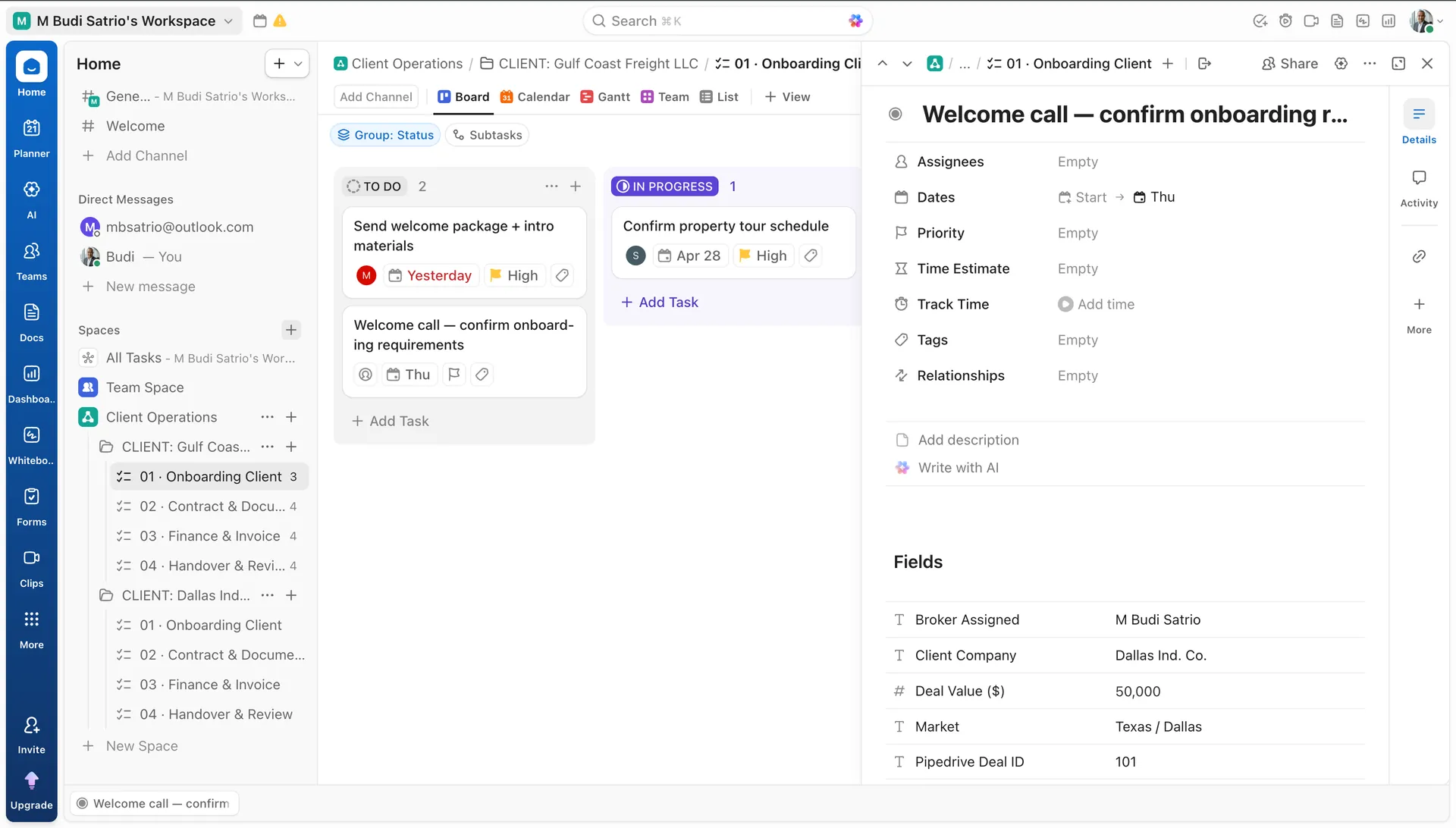
ClickUp · Task Detail · Custom Fields
Every task carries the deal context — broker, value, market, Pipedrive ID
Task: "Welcome call — confirm onboarding r..." Fields section: Broker Assigned = M Budi Satrio · Client Company = Dallas Ind. Co. · Deal Value ($) = 50,000 · Market = Texas / Dallas · Pipedrive Deal ID = 101. Sidebar shows CLIENT: Dallas Ind... folder with same 4 lists — second client workspace created by Make.
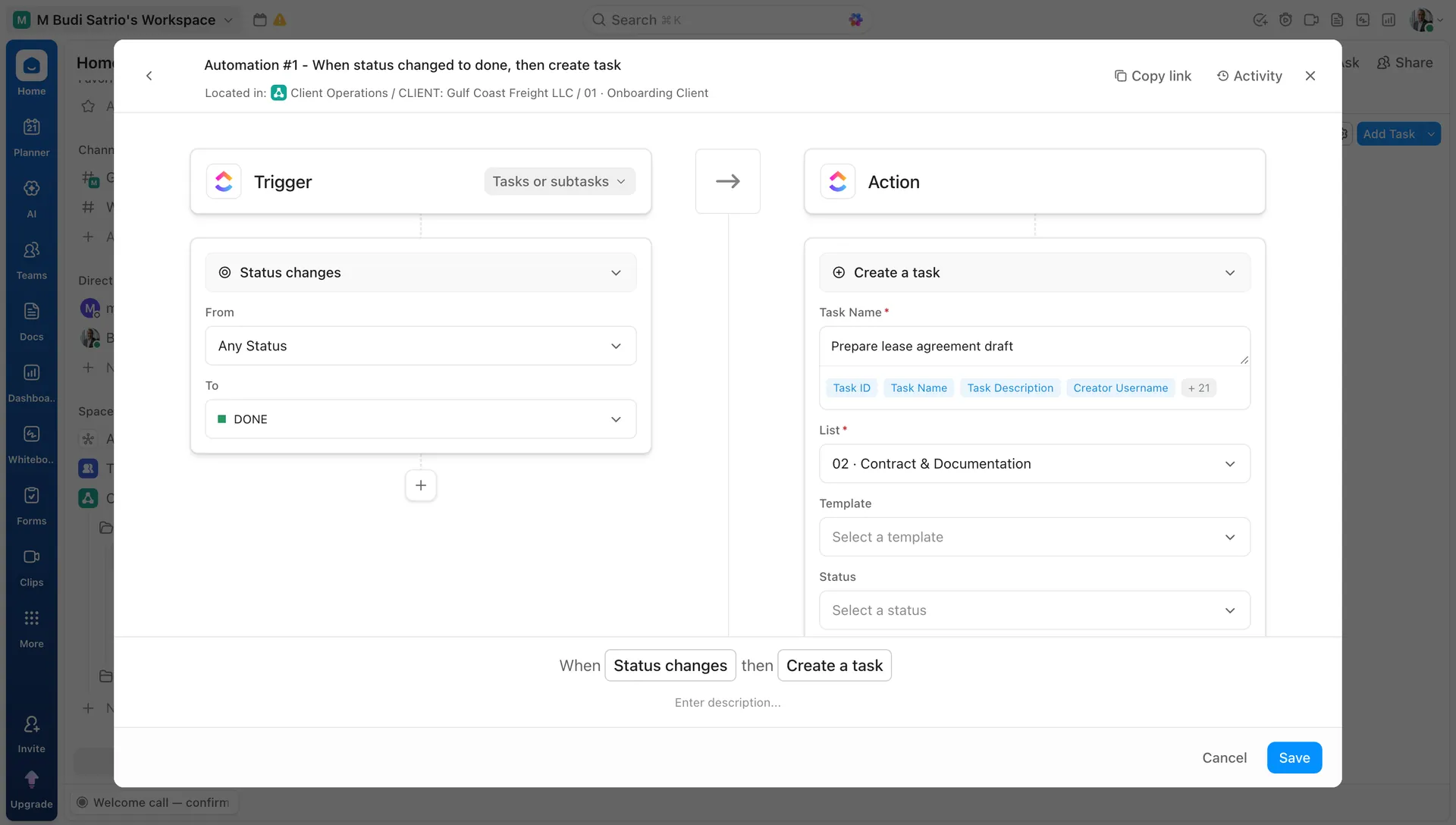
ClickUp · Automation · Workflow Chaining
Onboarding done → Contract task created automatically. Lists chain themselves.
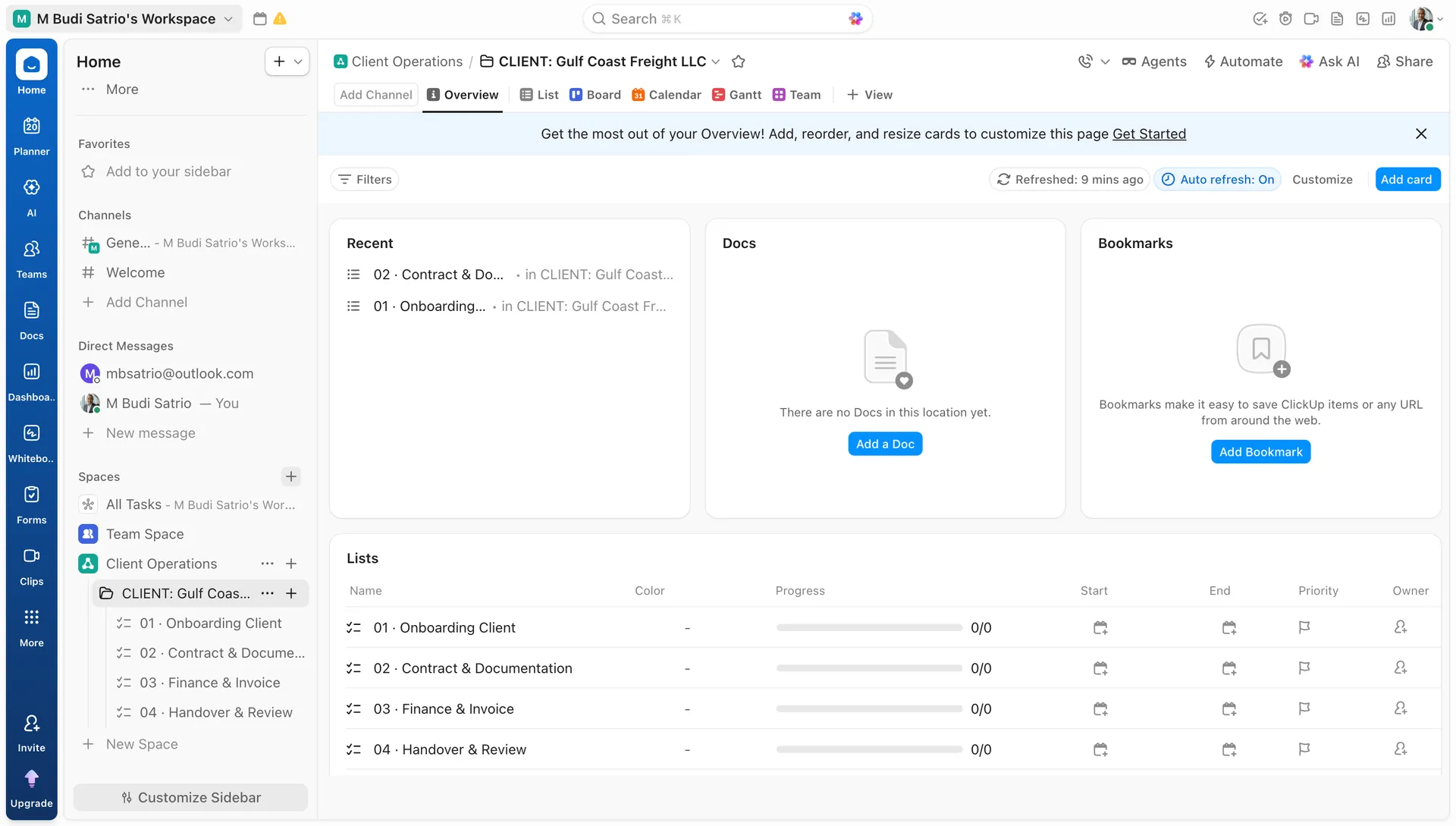
Automation #1. Located in: Client Operations / CLIENT: Gulf Coast Freight LLC / 01 Onboarding Client. Trigger: Status changes → From Any Status → To DONE. Action: Create a task "Prepare lease agreement draft" in List "02 · Contract & Documentation." When every task in List 01 is done, List 02 activates itself — no manual handover.
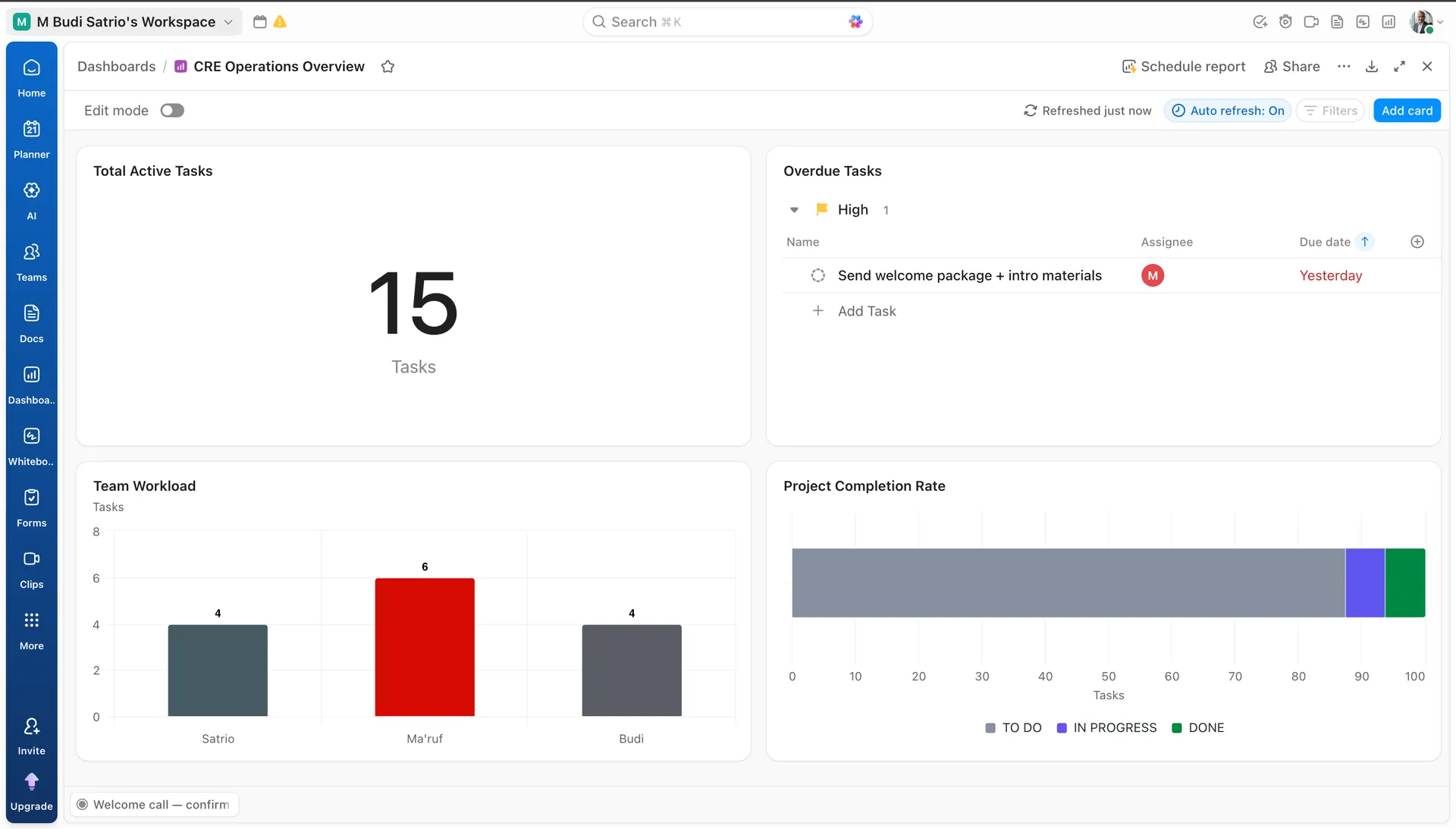
ClickUp · Dashboard · CRE Operations Overview
15 active tasks. 1 overdue. Workload distributed. Completion tracked.
Dashboard "CRE Operations Overview": Total Active Tasks = 15 · Overdue Tasks: High priority 1 ("Send welcome package + intro materials", Yesterday) · Team Workload bar: Satrio 4 · Ma'ruf 6 · Budi 4 · Project Completion Rate: TO DO / IN PROGRESS / DONE stacked bar. Auto refresh: On. Refreshed just now.
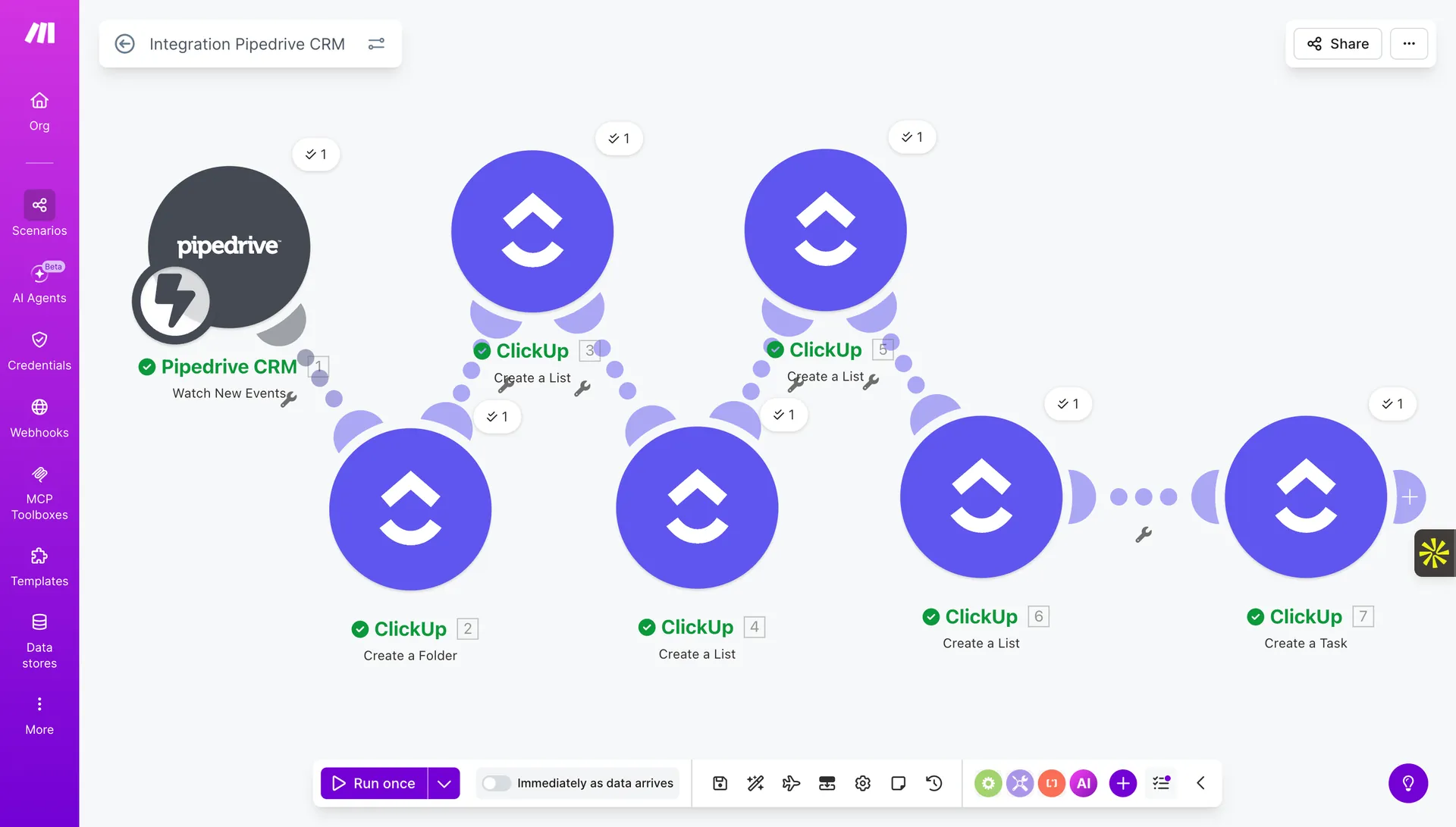
Make · Integration Pipedrive CRM · Pipedrive → ClickUp
Deal won in Pipedrive → ClickUp workspace built automatically in seconds
Scenario "Integration Pipedrive CRM": Pipedrive CRM Watch New Events (✓1) → ClickUp Create a Folder (✓2) → ClickUp Create a List × 3 (✓3, ✓4, ✓5) → ClickUp Create a List (✓6) → ClickUp Create a Task (✓7). Schedule: Immediately as data arrives. All 7 modules green — confirmed execution. One Pipedrive event builds a complete client delivery system.
2
Client workspaces live
15
Active tasks in dashboard
7
Make modules → full workspace
5
Tools integrated & live
160
ICP contacts from 1,343
4
Make scenarios in production
$102k
Live pipeline in Pipedrive
0
Manual data entries
Ready to Build Yours?
Stop Managing Leads. Start Closing Deals.
You just saw 5 tools working as one system — sourcing, scoring, outreaching, tracking, and delivering without anyone managing it manually. I build this for CRE brokers and B2B firms. Let's talk about yours.